MyBB Development Blog

Welcome to the MyBB Development Blog. Here you'll find updates relating to the development of future versions of MyBB as well as technical discussions, tips, tricks and modifications to help you get the most out of MyBB.

MyBB 1.4 Admin CP – The Complete Overview (Part 1)

By Chris Boulton | Published February 9th, 2008 | Updates | Rating: 1 Star2 Stars3 Stars4 Stars5 Stars Loading ... Loading ...

As most of you would already know, MyBB 1.4 has been in development for quite a while. The reason for this is that the administration area of MyBB has received a complete overhaul, along with several new features being implemented.

It’s now time to release information regarding the new Admin CP and I’ll be doing so over a series of posts which cover the different sections of the administration panel. I’ll be covering how we developed the admin panel and reasons why we’ve structured it as it is. I’ll also be answering any questions that users may have.

In this post, I’ll be introducing the administration panel, the configuration area and talking about some of our design decisions.
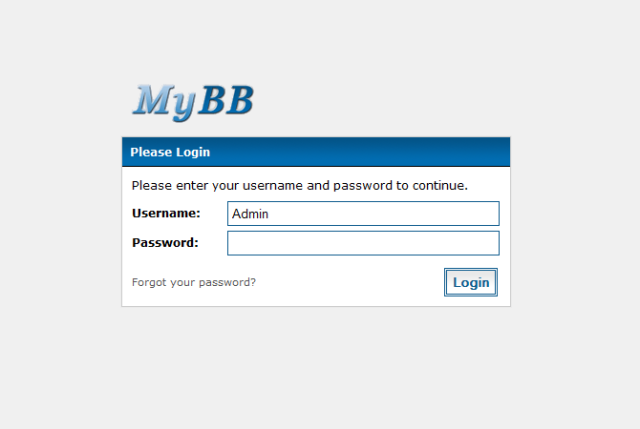
The Login Screen

The Login Screen

The first page you see when you first visit the administration panel is the login screen. It’s essentially your standard login screen however it now looks much more user-friendly and pleasing to the eye.
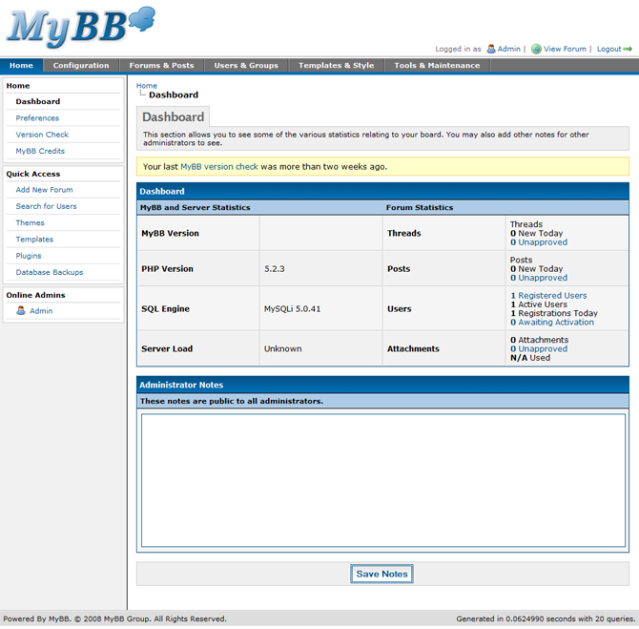
The Dashboard

The Dashboard

Once you’re logged in, you are sent to the dashboard where you are given an overview of your installation of MyBB. As you can see, the interface is tabbed and divided into different sections for the tasks you can perform. Navigation in each section is performed on the left menu.

It was decided that a tabbed design would be the most sensible to use for MyBB because we’ve got quite a large amount of tasks that can be undertaken via the Admin CP and to list them all (as we do with the current 1.2 Admin CP) makes the whole control panel feel very cluttered and hard to navigate.

Along the top you see the primary tabs:

  • Home – The main dashboard as shown above. This page also allows access to the version checking and control panel preferences for the current user.
  • Configuration - Everything to do with the configuration of your forum on a global level is done in this section. This includes things such as settings, smilies, bad words and help documents.
  • Forums & Posts – Anything relating to forum and post management is performed on this tab. This includes creating and managing forums, assigning permissions to forums, searching for attachments and moderating the thread & post queues.
  • Users & Groups – Everything relating to users such as account management, banned accounts, user groups, mass emailing, group promotions, etc. is performed via this tab.
  • Templates & Styles – Anything relating to the appearance (themes) and design (templates) of your board is changed via this tab.
  • Tools & Maintenance – A general section containing miscellaneous tools, logs and general maintenance messages belongs in this section. It contains items such as the task scheduler, email logs and the system health information.

As I mentioned previously, secondary navigation on the side of the page is used to navigate between the different features of each of the primary tabs – this includes things such as settings, smilies, bad words, help documents and calendars – all of which fall under the configuration tab.

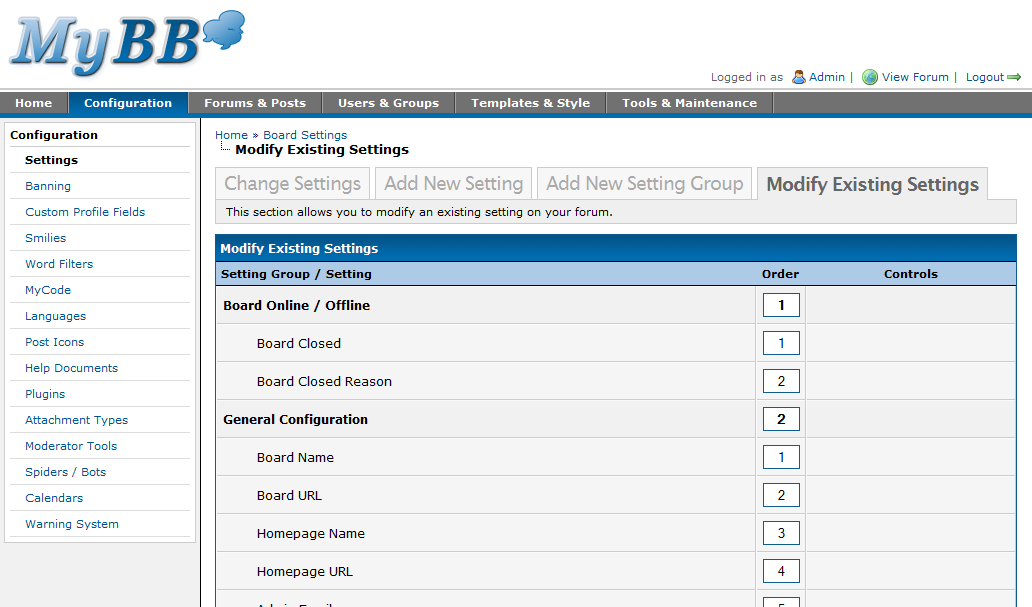
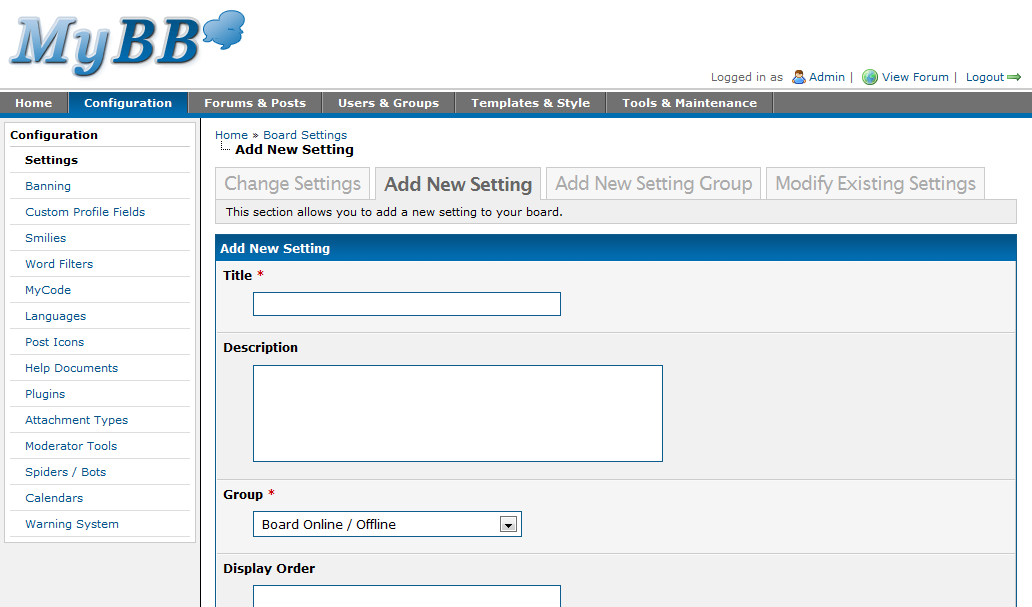
In order to reduce the complexity, this menu only contains the “base” actions, so clicking “Settings” will take you to the manage settings page and from there you can choose to manage existing settings, add a new setting or add a new setting group.

When researching the control panel, we took a look at how competitors do things. Some use our current approach (frames), whilst others use a tab based structure. The problem we found, however, with most of these other bulletin boards is that when we went to attempt to try and find a particular feature, it wasn’t where we would expect it to be, and we’d have to squint our eyes to read through the long lists of navigational menus. For this reason, we decided it would be better to break the navigation up between items even further, resulting in three levels of navigation per page.

I’ve had a few people mention to me (through the beta) that this would be extremely complicated for new users and you should never have more than (at most) two levels of navigation. Whilst this may be slightly true, it all comes down to how well the navigation is laid out and how easy it is to move from one section to another. In this case, because we’ve organised things in a logical manner, it isn’t complicated and you won’t get lost in the administration panel.

Settings

So, by now, you’re probably after another few screenshots – and maybe to better explain what I mean as well. When you click on “Configuration” in the top tab, you’re taken to the settings management page by default but you’ll notice the menu on the left has also changed to the “Configuration” context – where you’ll do all of the configuration for your forum.
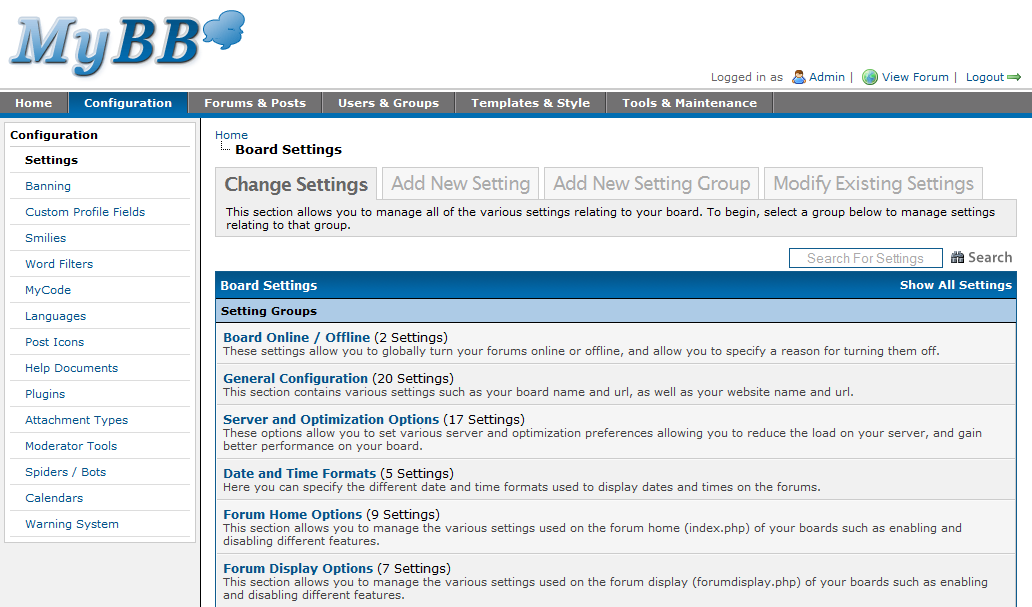
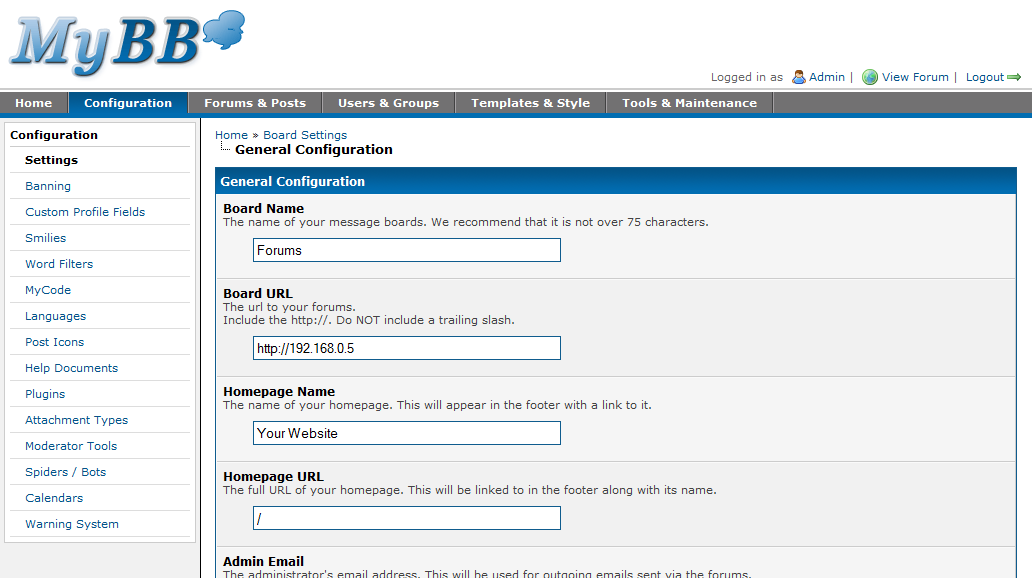
Settings

Settings

Changing Board Settings

Changing Board Settings

Adding a Setting

Adding a Setting

Banning

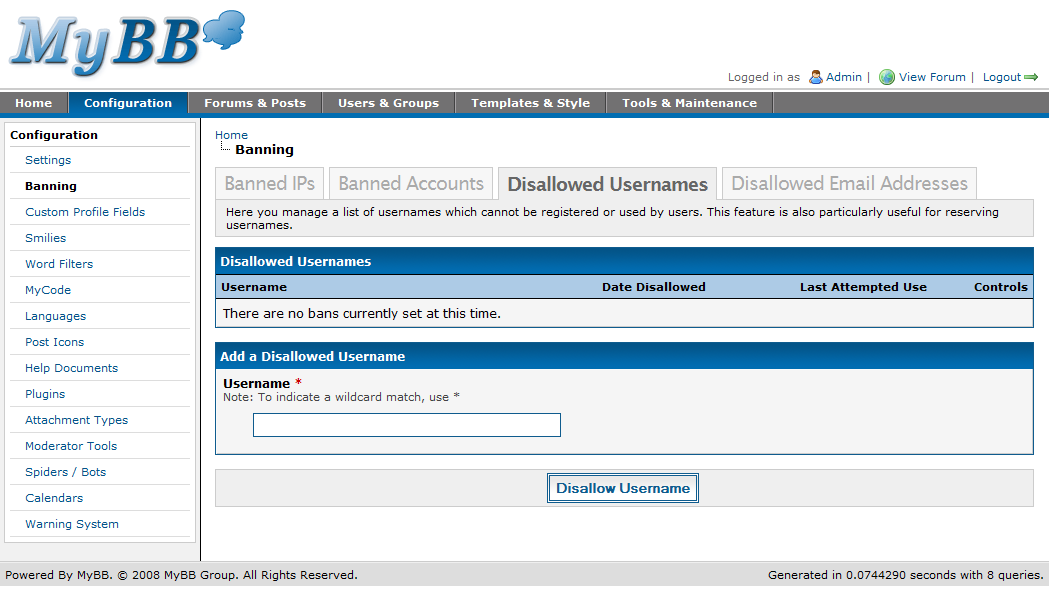
MyBB 1.4 moves the banning for email addresses, IP addresses and invalid usernames out of their previous (and strange) location under the settings page. The new banning tools support wildcards, and they show you when the last attempted use of the item was.
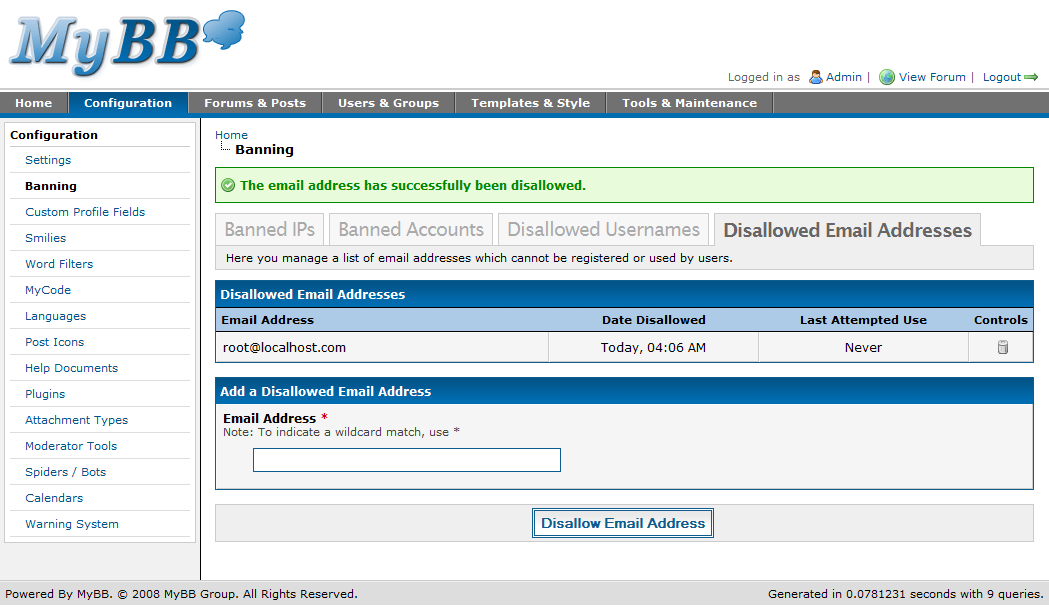
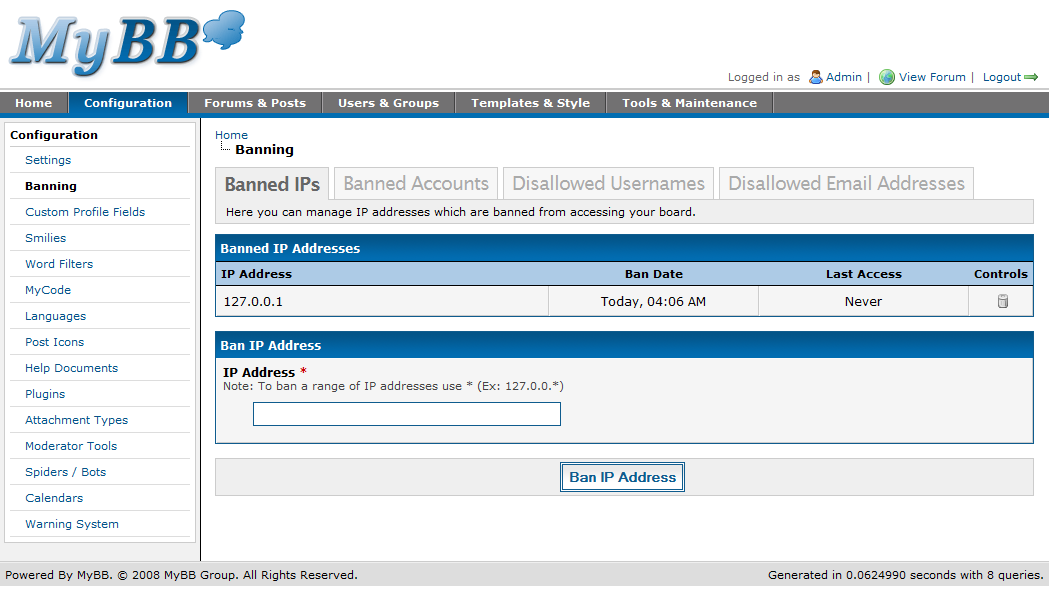
Disallowed Email Addresses

Disallowed Email Addresses

Banned IP Addresses

Banned IP Addresses

Disallowed Usernames

Disallowed Usernames

Custom Profile Fields

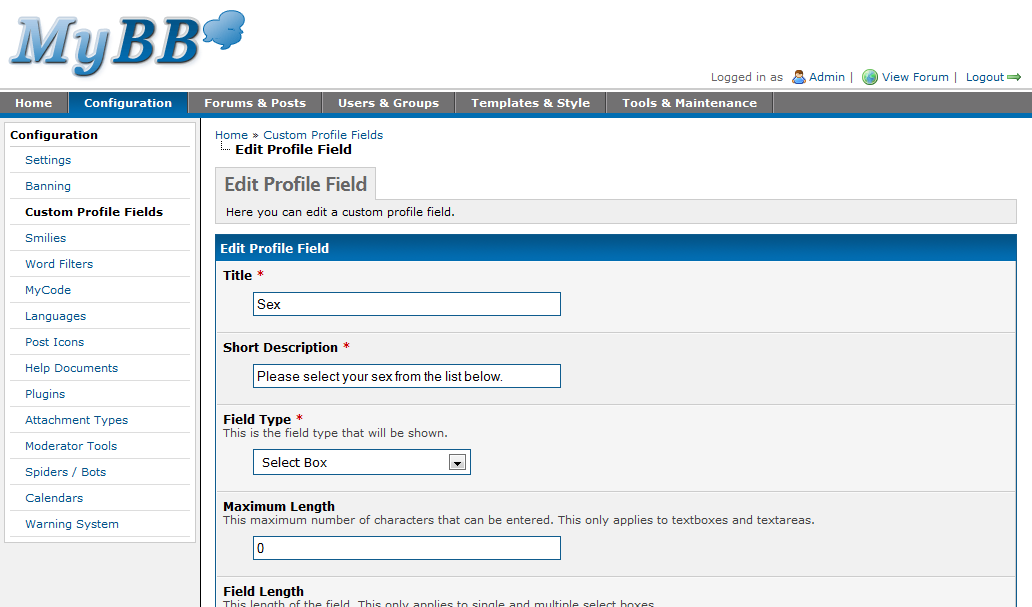
The custom profile fields section hasn’t changed much compared to previous versions. What has changed is that when you add a new profile field or edit an existing one, you’re not shown fields that are irrelevant for that type of profile field – for example when creating a text box profile field, you’re not asked to enter a list of options to be shown.
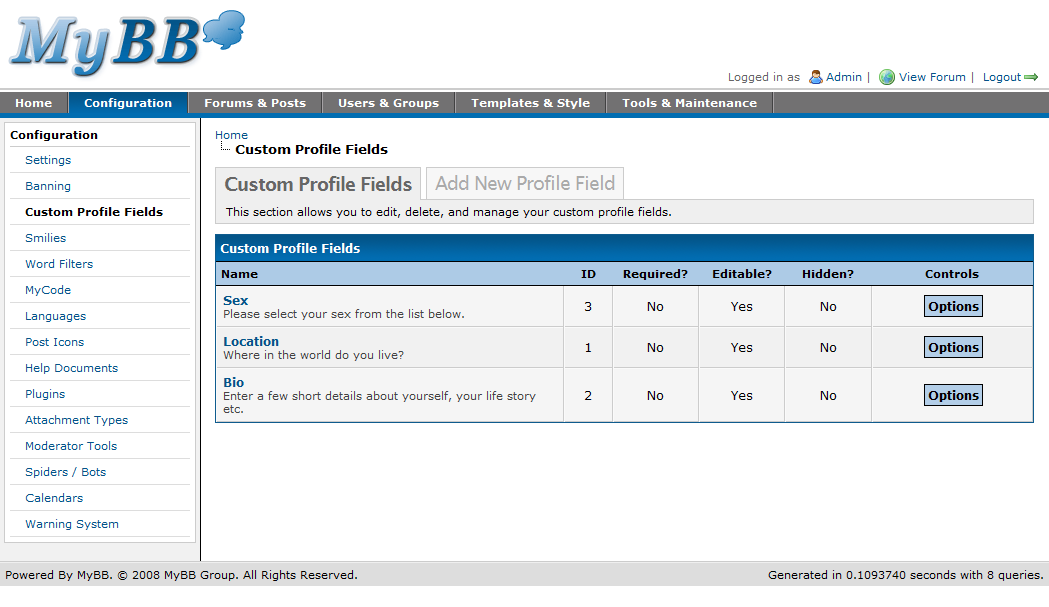
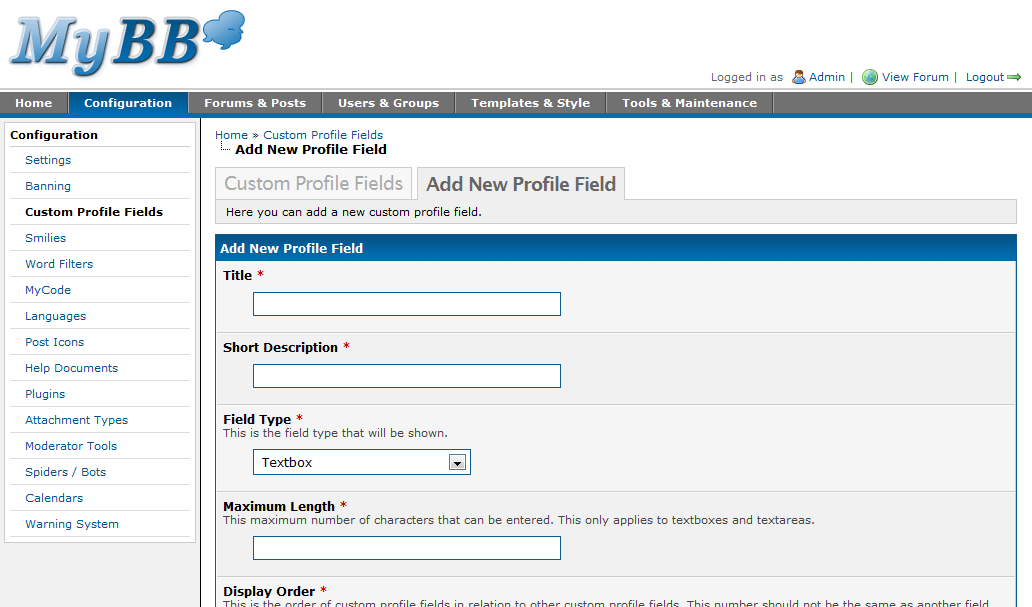
Custom Profile Fields

Custom Profile Fields

Adding a Custom Profile Field

Adding a Custom Profile Field

Editing a Custom Profile Field

Editing a Custom Profile Field

Smilies

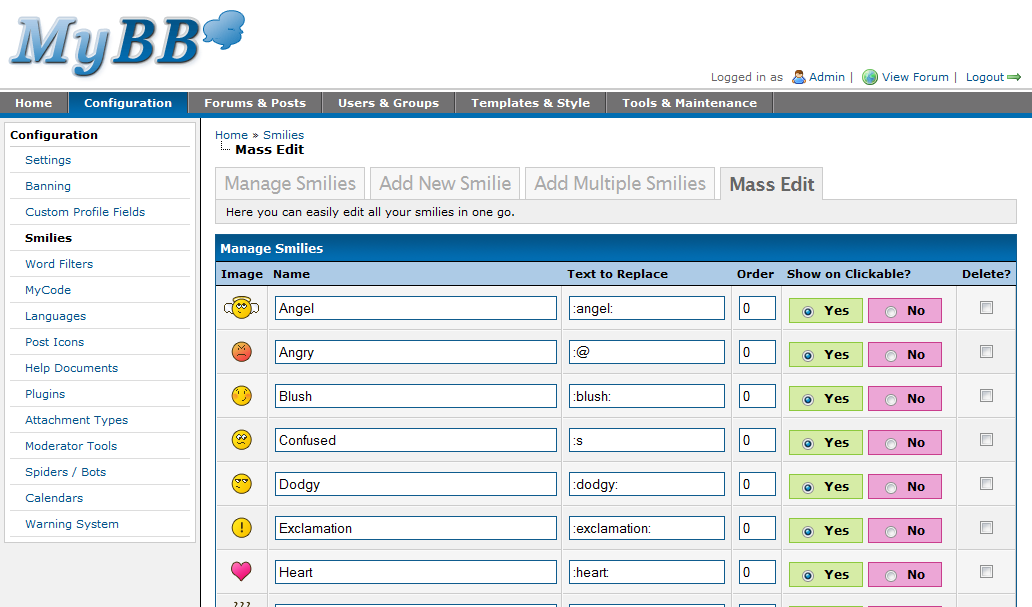
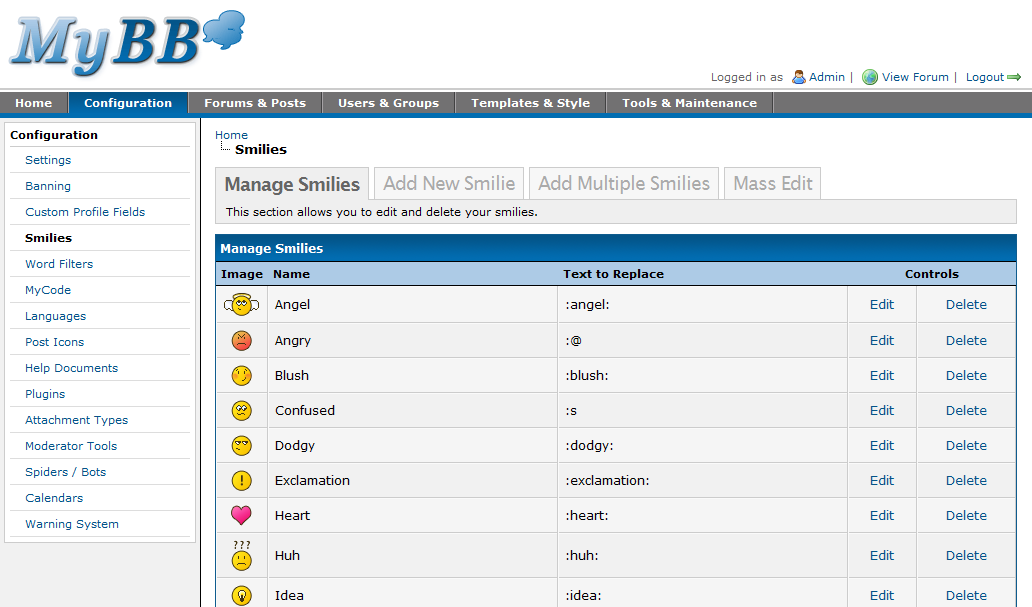
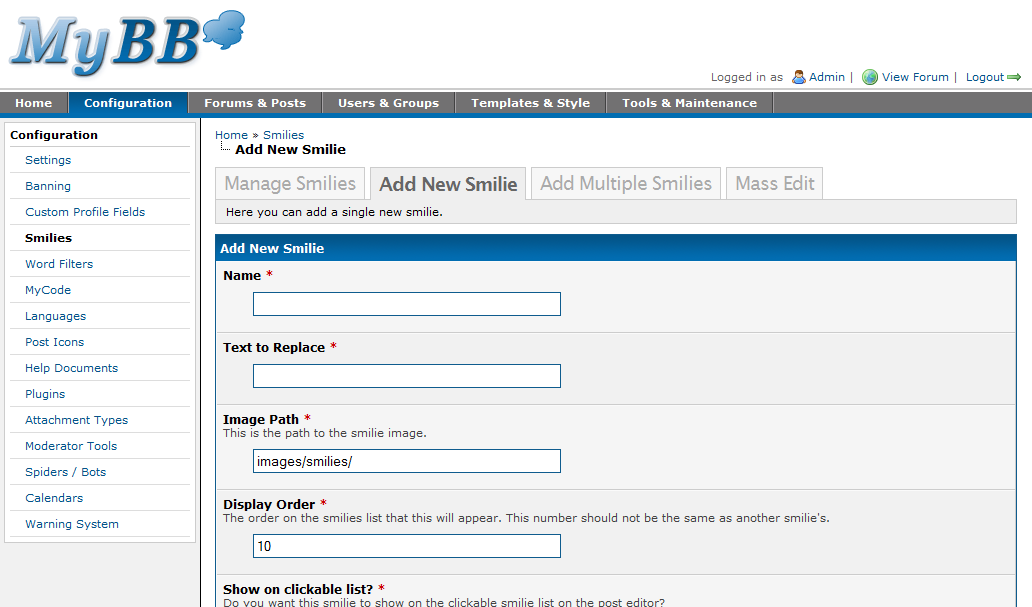
Smilie management has had a bit of a revamp. First, from the screenshot, you’ll also notice MyBB will be shipping with a brand new set of smilies. The old smilies were way past their expiry date and were something I quickly threw together for the release. The new smilies? I sat down, thought about how they should look and the end result speaks for itself.

Additionally you’ll notice that when clicking on “Mass Edit” you can now edit more than one smiley at a time. Great for when you want to update a whole bunch but don’t want to navigate through all of the pages individually.
Smilies

Smilies

Adding a Smilie

Adding a Smilie

Mass Editing Smilies

Mass Editing Smilies

Word Filters (Bad Words)

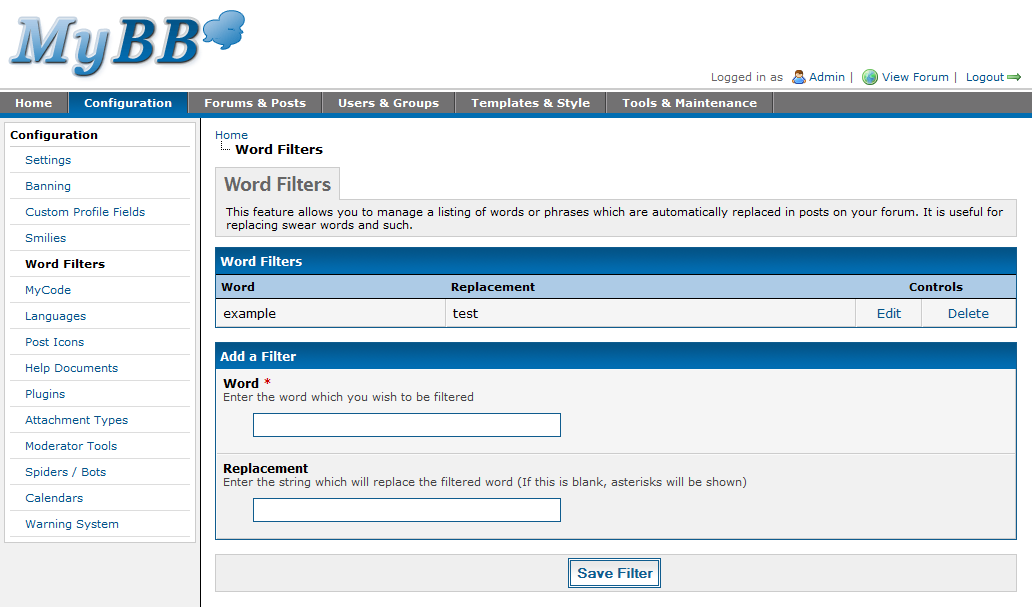
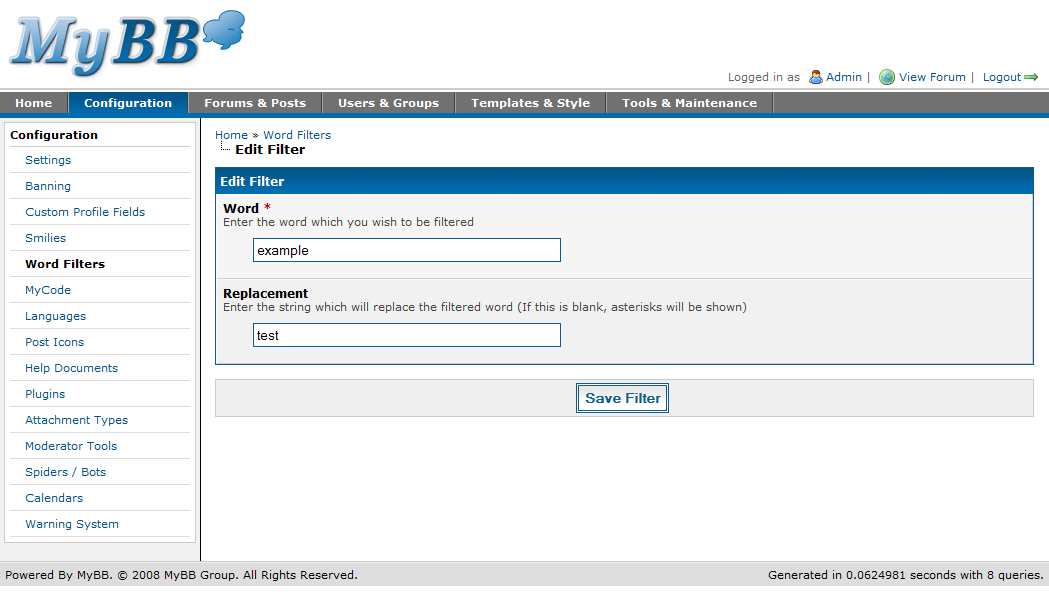
The word filters page lets you define a list of words that should be replaced in posts. You’ll notice that because this feature is so simple and there isn’t much to do on it, you can add a new word filter from the existing management page.
Word Filters

Word Filters

Editing a Word Filter

Editing a Word Filter

MyCode

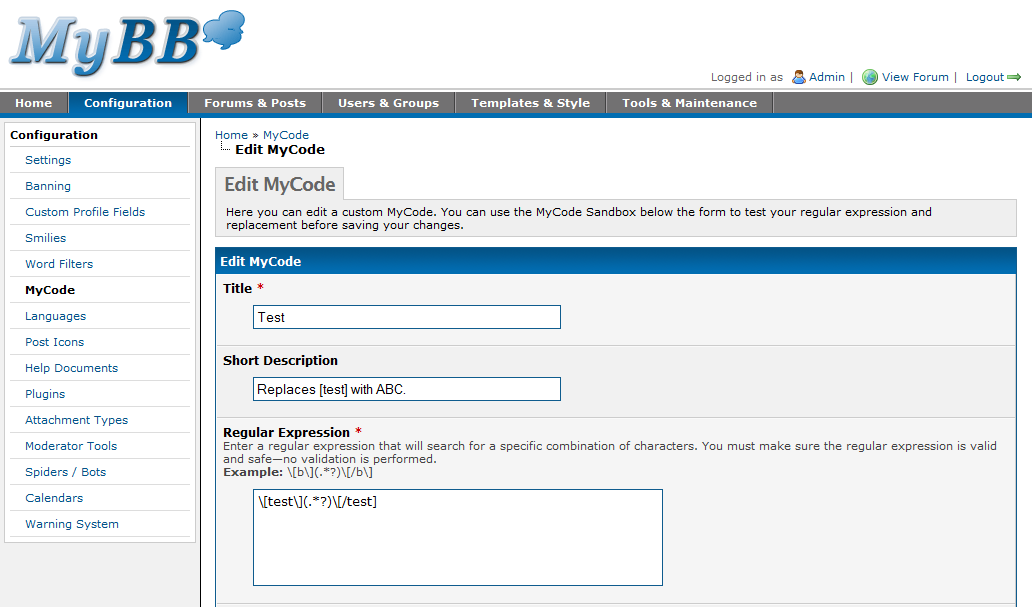
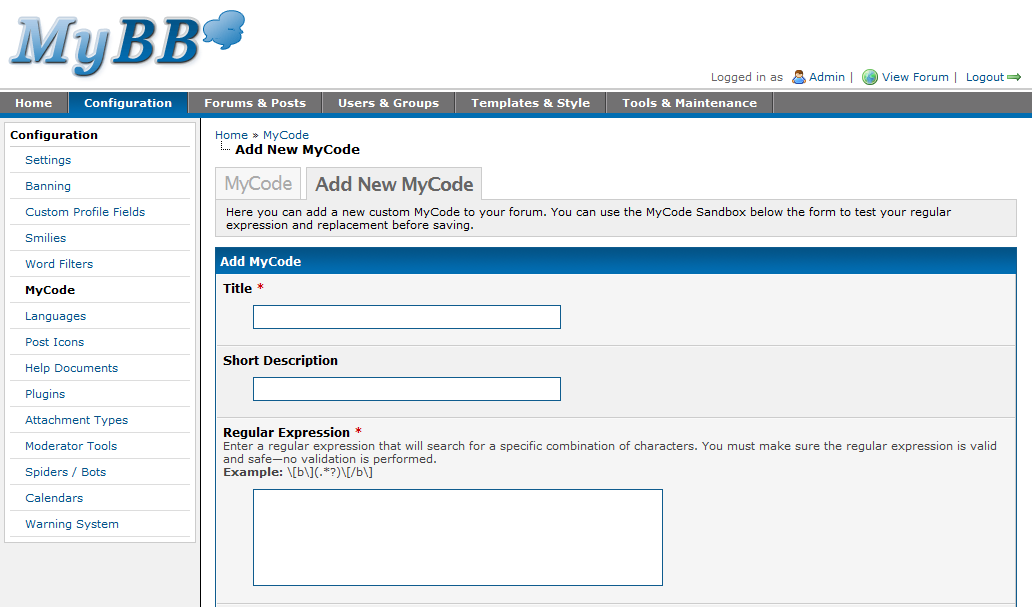
The MyCode manager allows you to create your own custom MyCode without editing any of the MyBB post parsing files. You can create custom MyCode based off regular expressions, by specifying what to search for, and your replacement text.
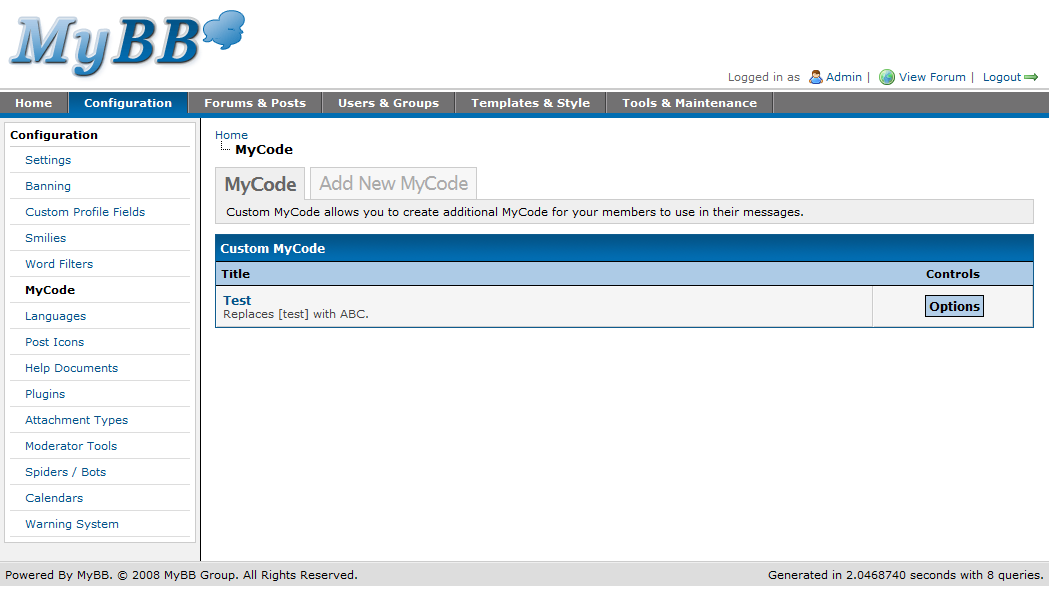
MyCode

MyCode

Adding a Custom MyCode

Adding a Custom MyCode

Editing a Custom MyCode

Editing a Custom MyCode

Languages

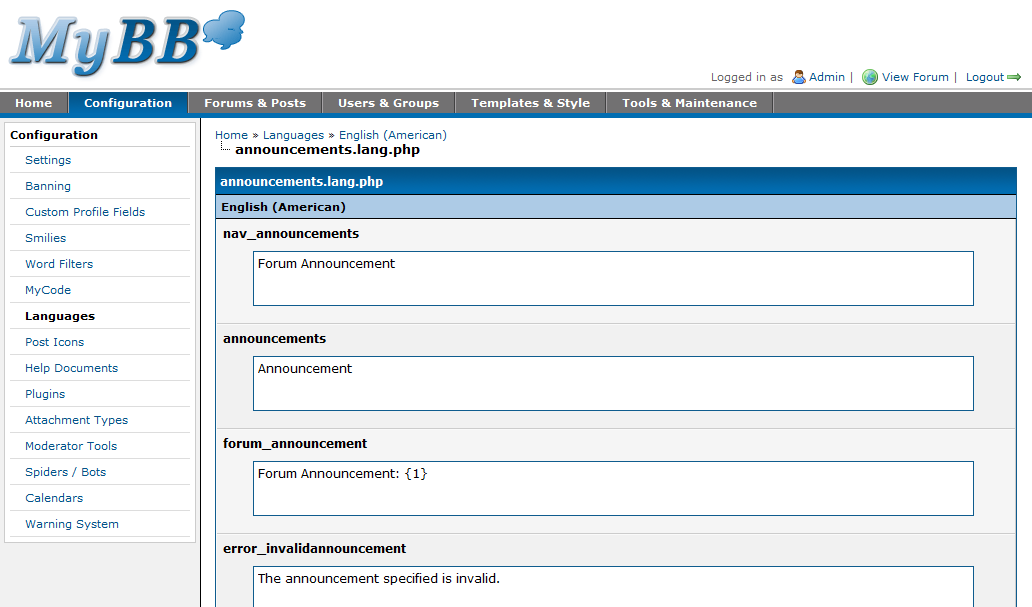
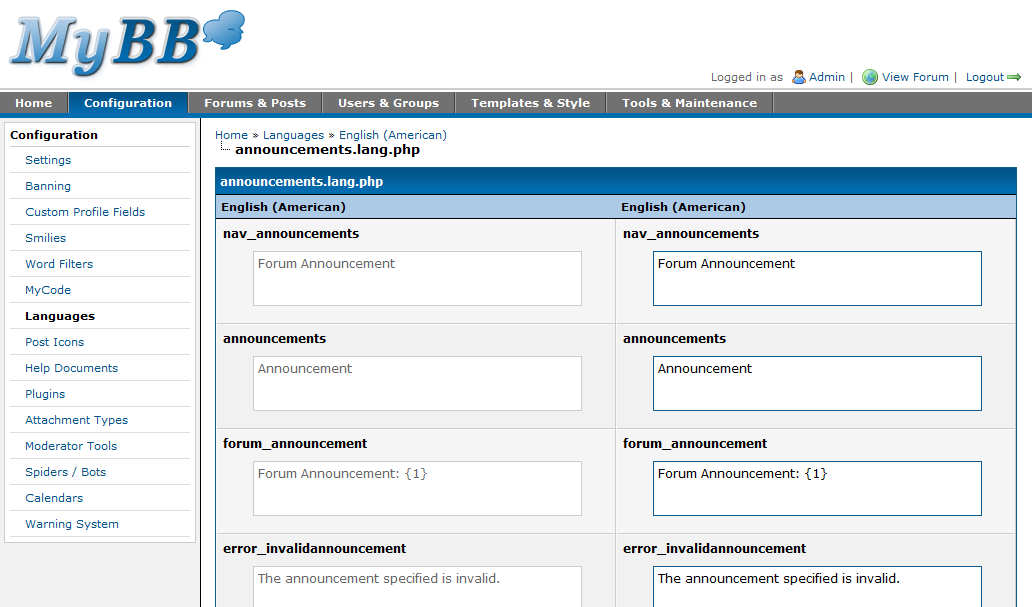
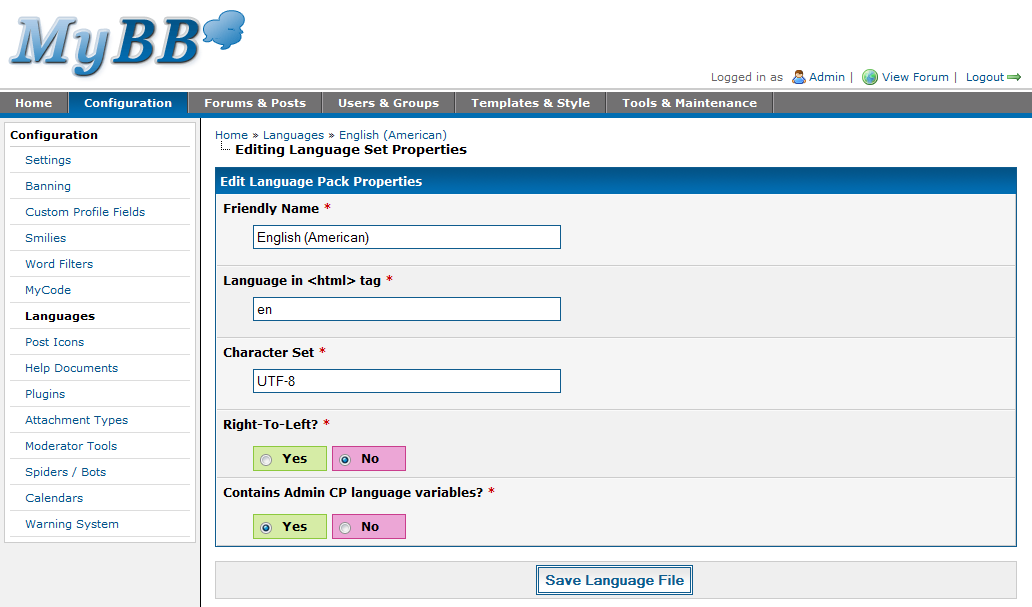
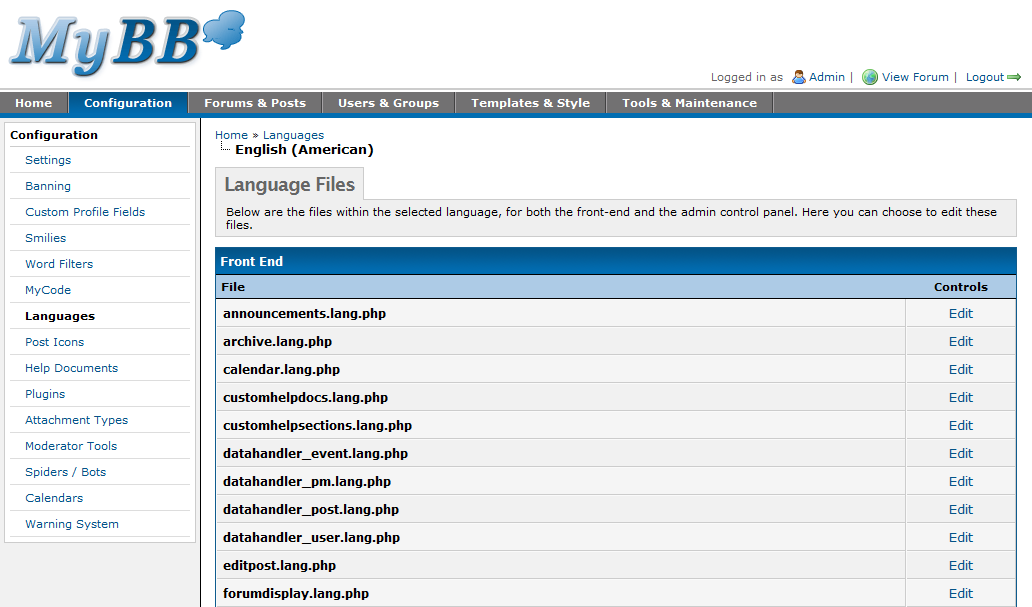
The language manager provides a full interface for translating MyBB via your web browser with no technical experience required. It hasn’t changed that much since 1.2, however, behind the scenes the code has been completely redeveloped.
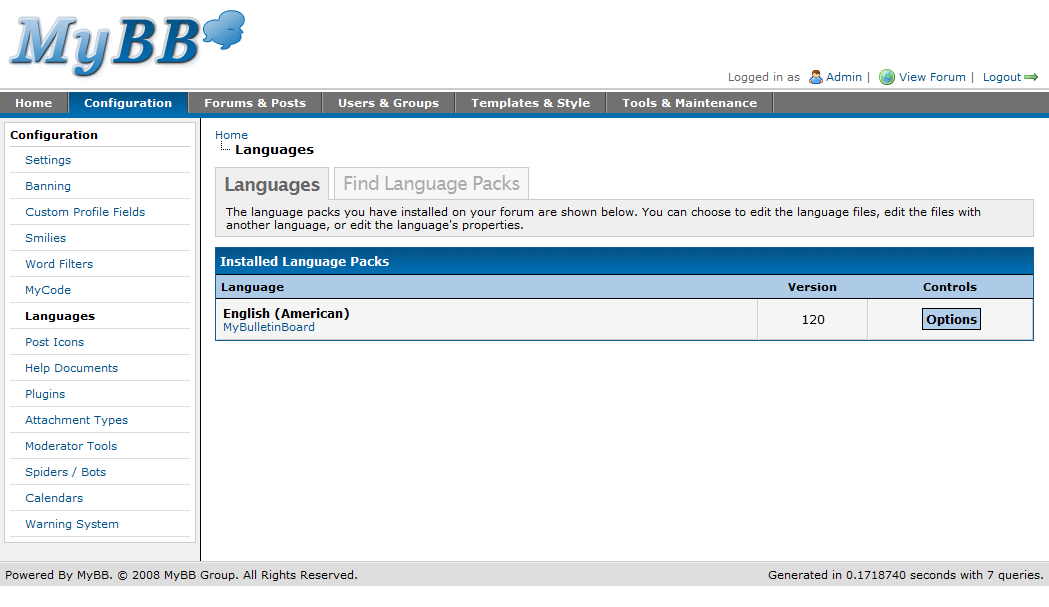
Languages

Languages

Editing a Language Set

Editing a Language Set

Editing a Language File

Editing a Language File

Editing a Language File (Comparison View)

Editing a Language File (Comparison View)

Editing Language Set Properties

Editing Language Set Properties

Post Icons

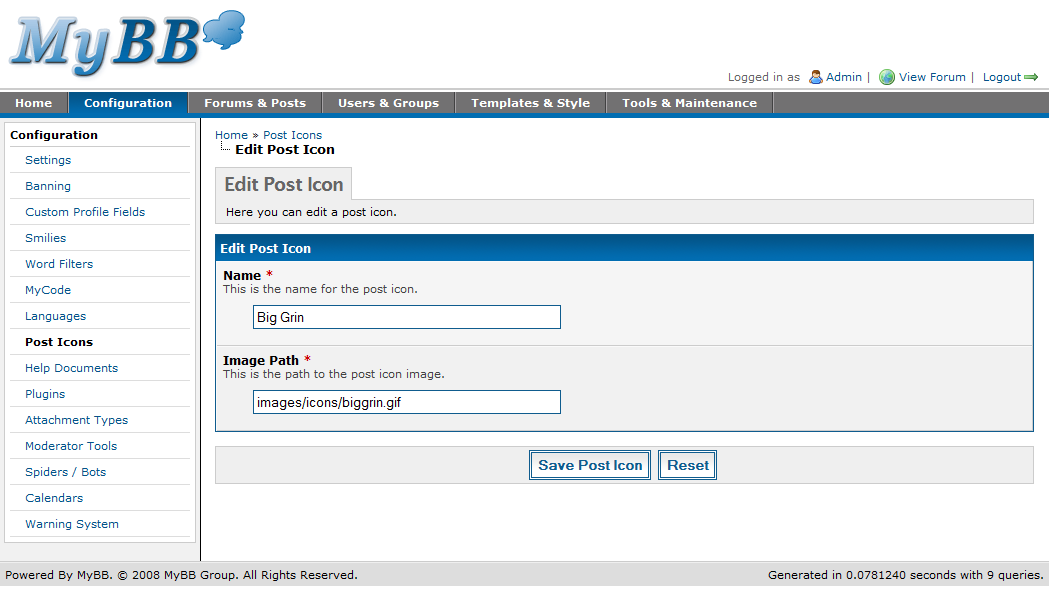
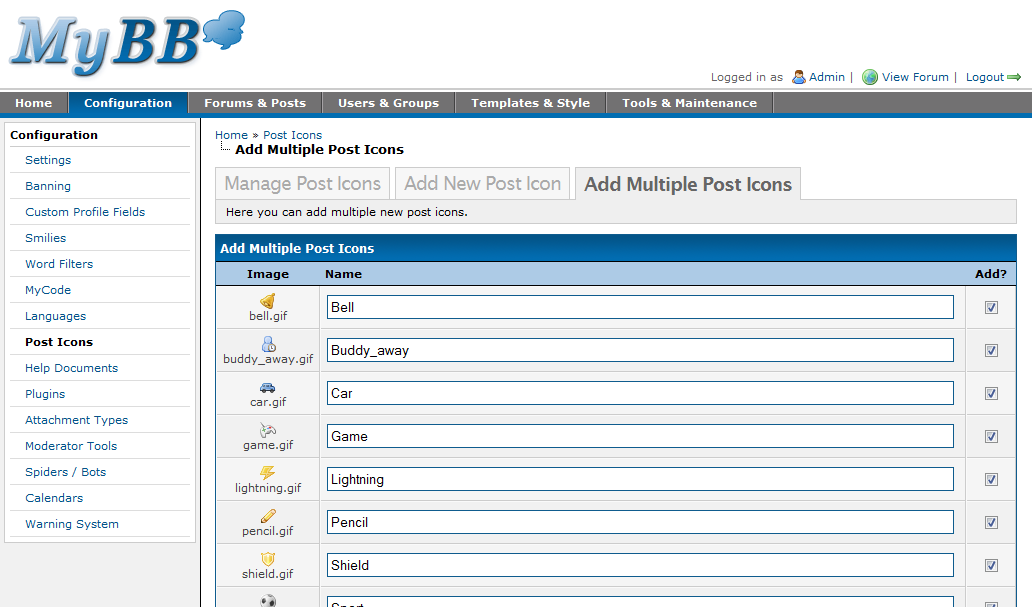
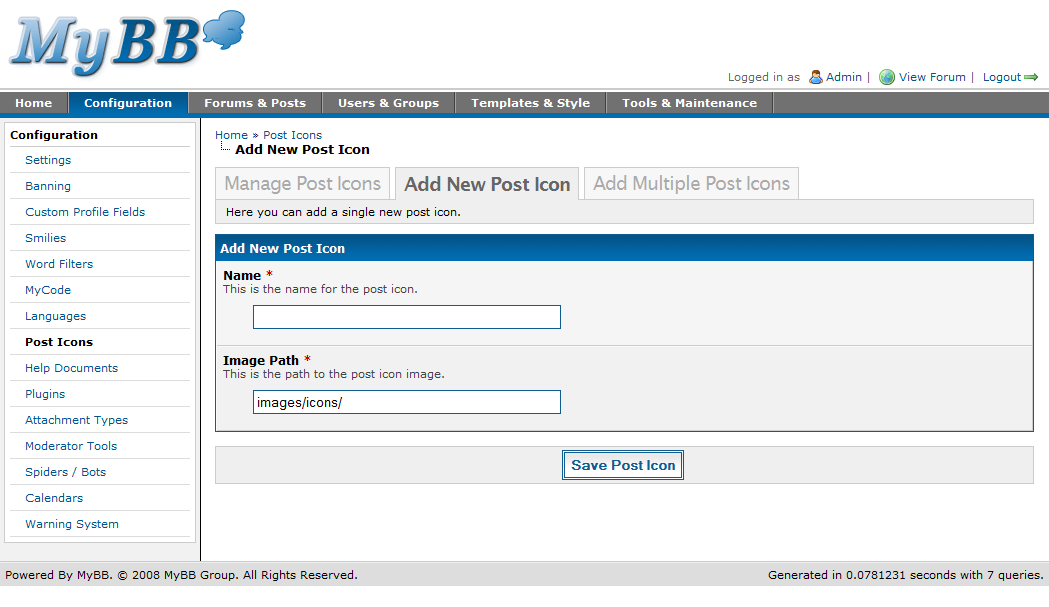
The post icons feature was probably one of the most neglected features of earlier versions of MyBB. We shipped with very few, and mostly pointless post icons by default. Things have changed in MyBB 1.4 and we’re now bundling some of the gorgeous famfamfam icons by default as post icons. The management interface is relatively similar to past versions – you can create post icons either individually or in bulk by specifying a directory to fetch them from.
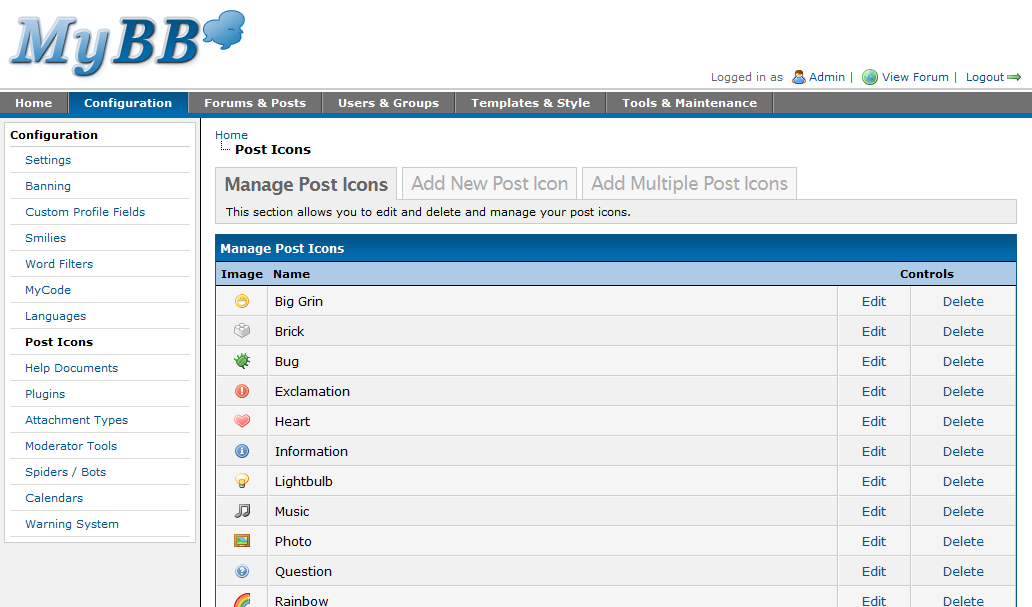
Post Icons

Post Icons

Adding a Post Icon

Adding a Post Icon

Editing a Post Icon

Editing a Post Icon

Mass Editing Post Icons

Mass Adding Post Icons

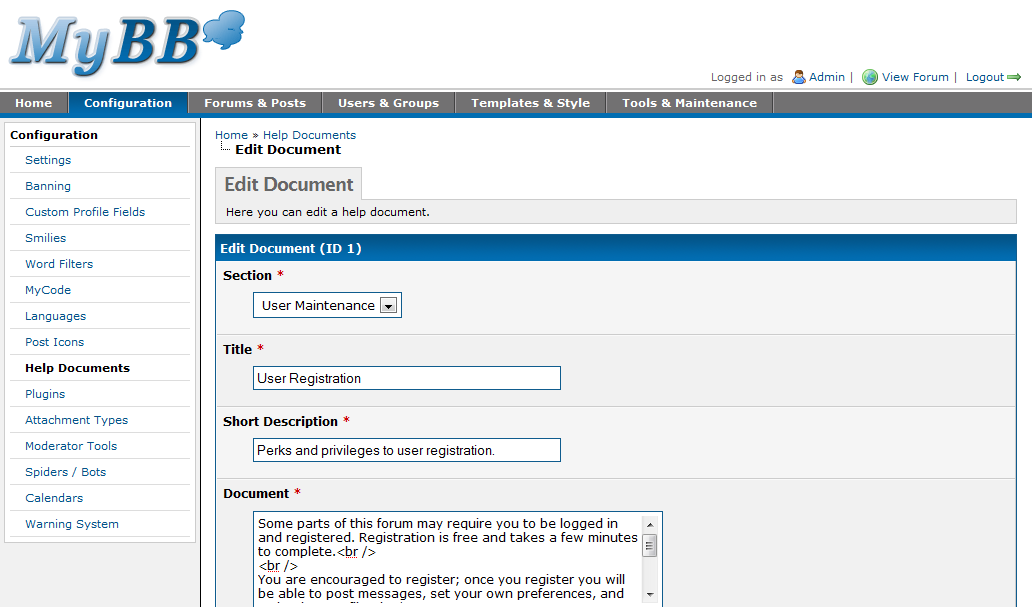
Help Documents

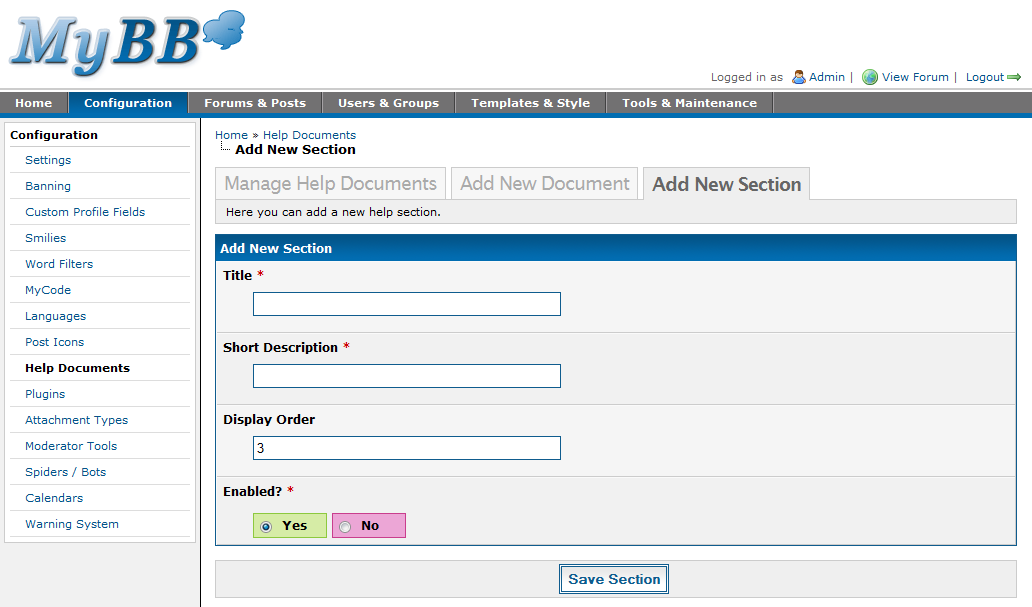
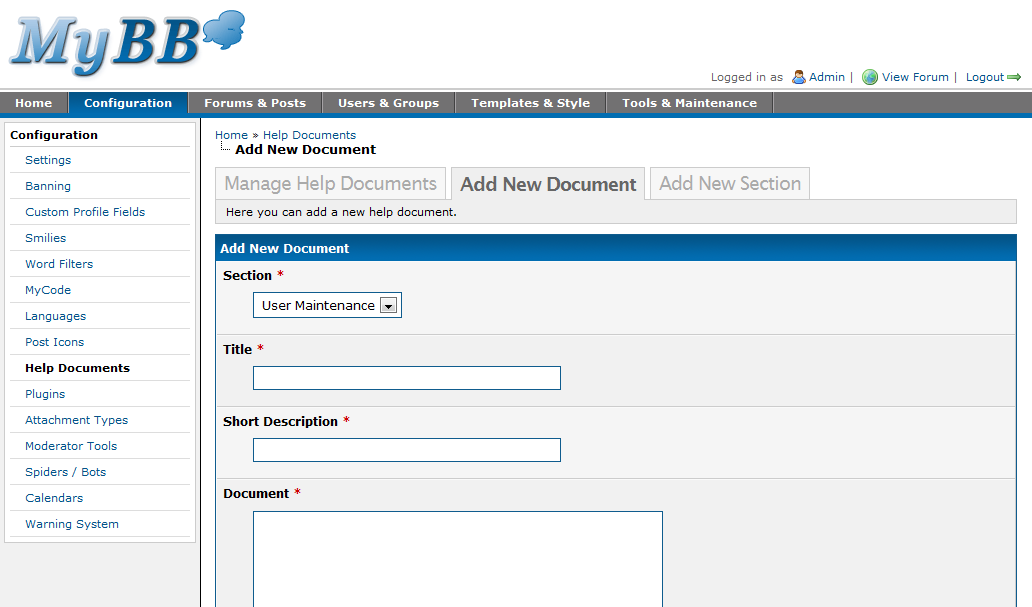
The help documents section has seen a bit of a revamp – you can now edit the default help documents (previously, you’d need to edit the language files to do so). We’ve also cleaned up the interface a little and made it easier to use.
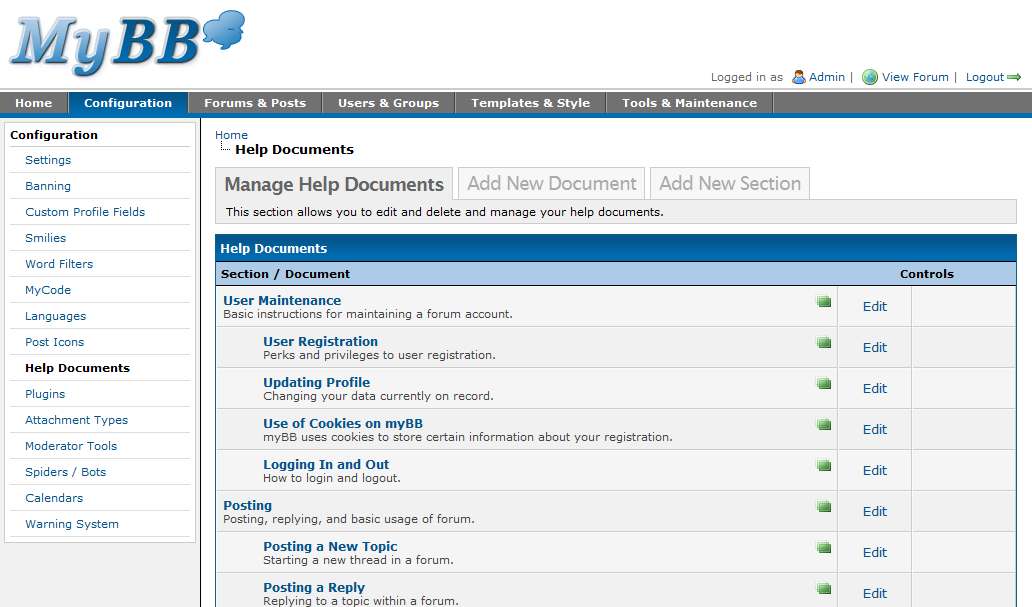
Help Documents

Help Documents

Adding a Help Document

Adding a Help Document

Adding a Help Section

Adding a Help Section

Editing a Help Document

Editing a Help Document

Plugins

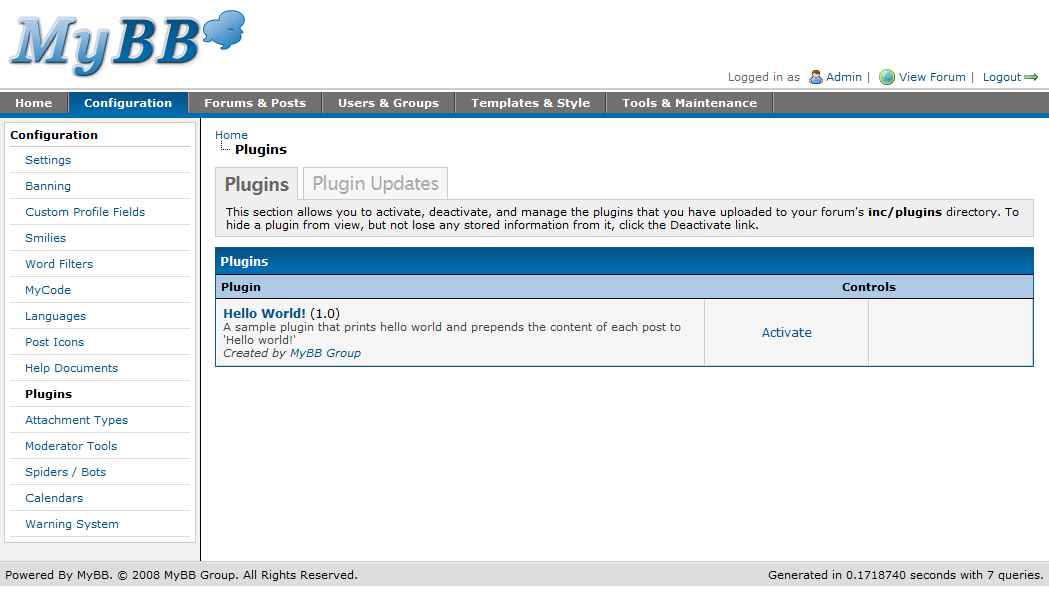
The plugin manager allows you to enable or disable any plugins you have in your plugins directory. The plugins system in 1.4 has had a bit of a revamp as well. You can now define custom install and uninstall routines and allow users to completely uninstall a plugin or just disable it (hide it from view). Plugins can also be marked as only being compatible with certain versions of MyBB.

Plugin update checking is also built in. Plugin developers, when posting their plugin on the MyBB Mods site, receive a unique ID which, when placed in their plugin, will allow users to check for newer versions directly via the MyBB Admin CP.
Plugins

Plugins

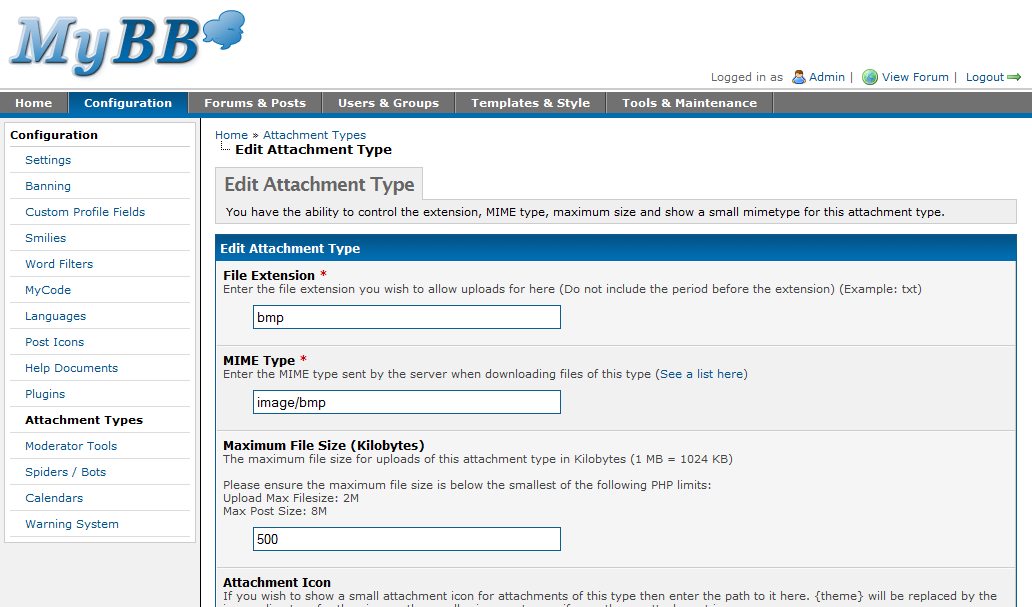
Attachment Types

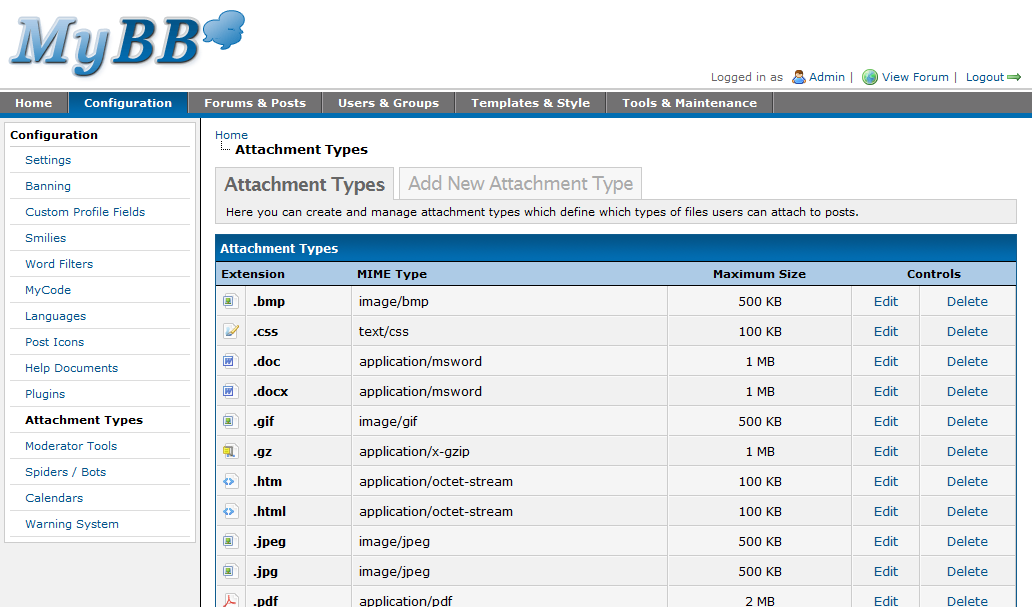
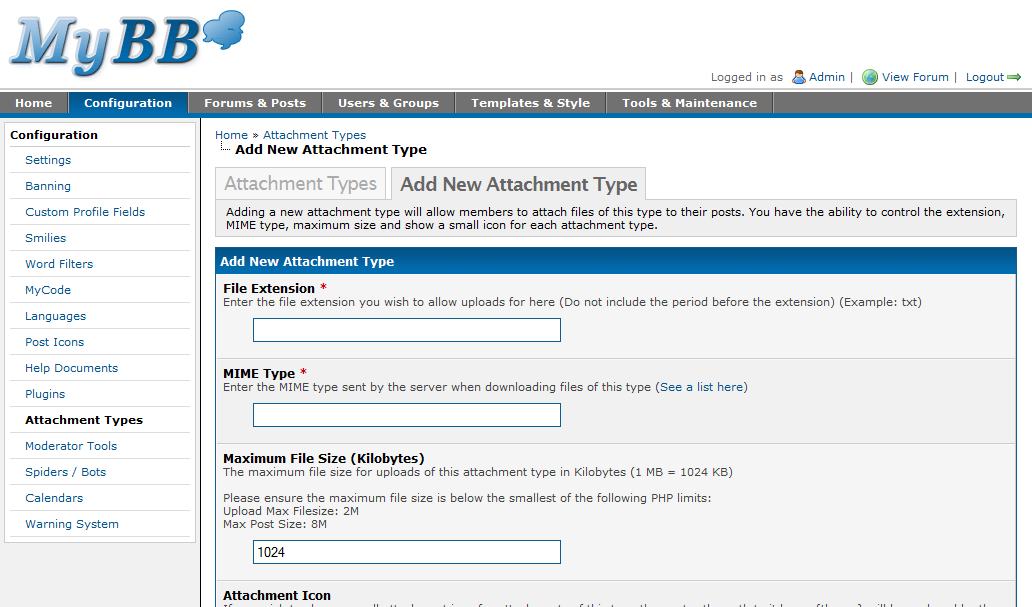
Not much of an explanation is needed here, these are a list of the attachment types that can be uploaded to your forums.
Attachment Types

Attachment Types

Adding an Attachment Type

Adding an Attachment Type

Editing an Attachment Type

Editing an Attachment Type

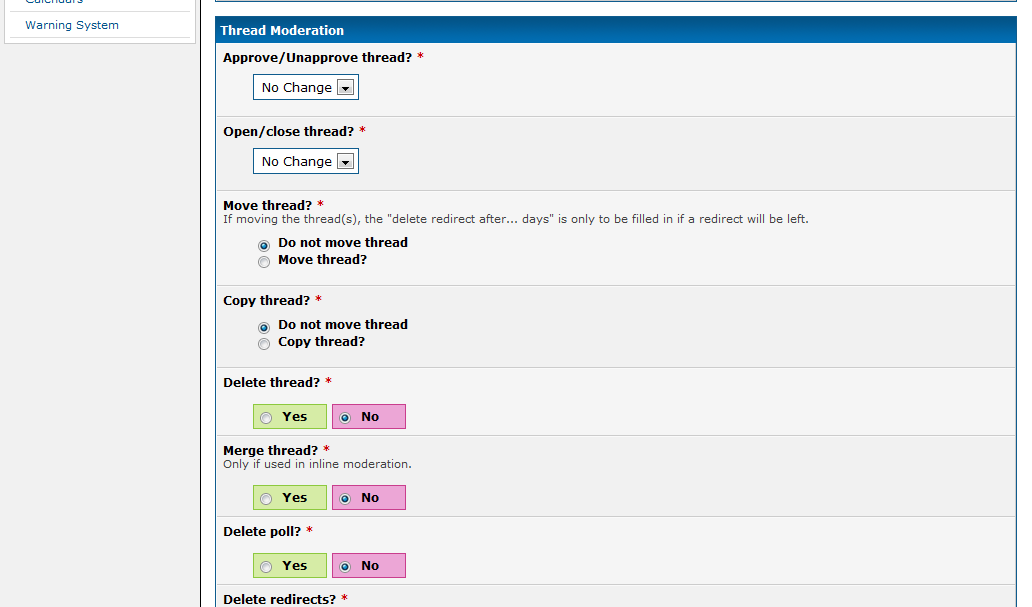
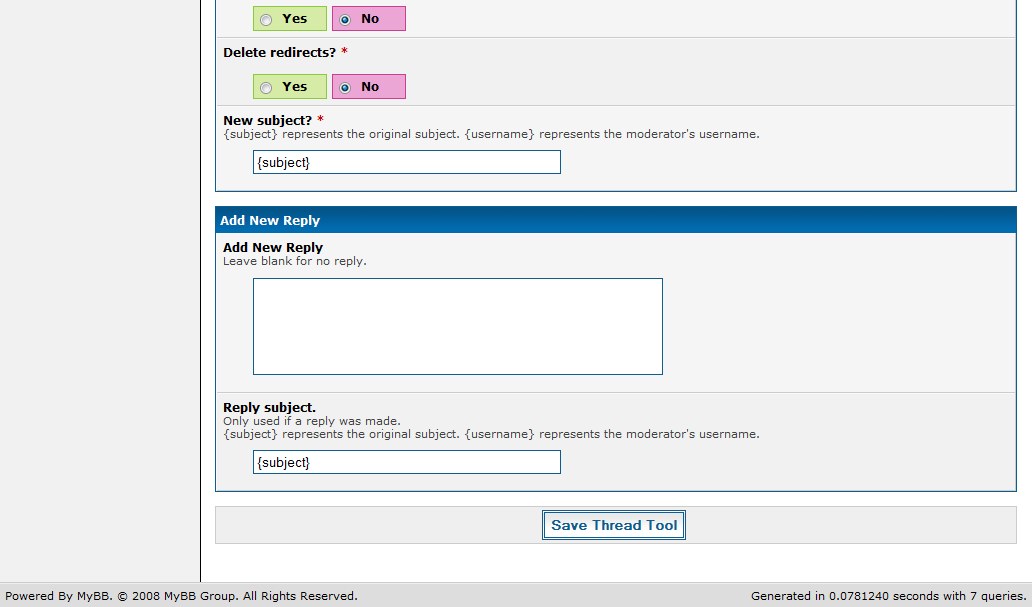
Moderator Tools

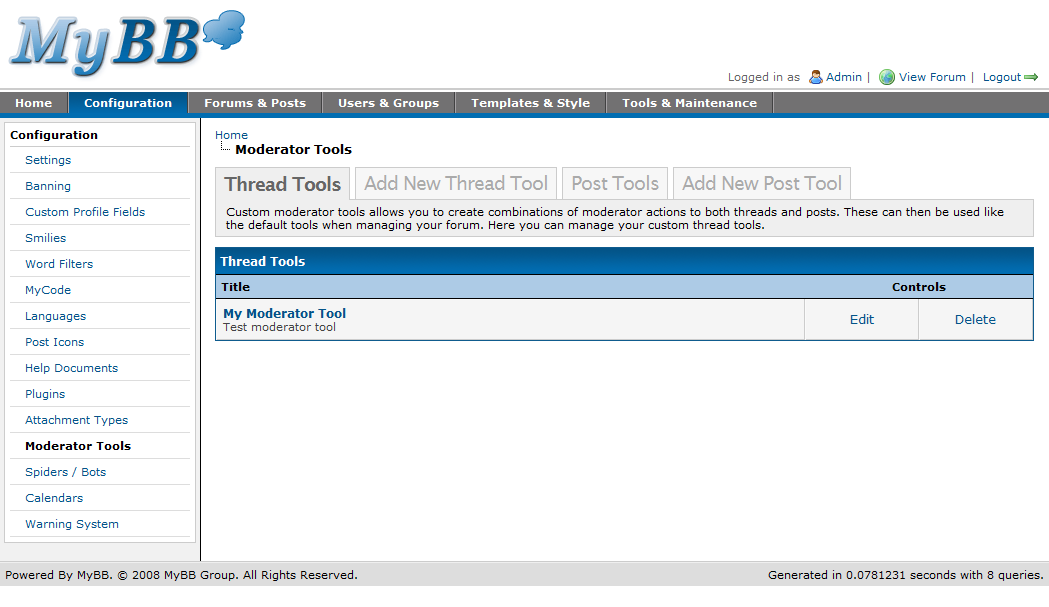
Any custom thread or post moderation tools you create are managed here. Custom moderation tools allow you to quickly perform multiple moderation actions on one or more threads or posts at the same time.
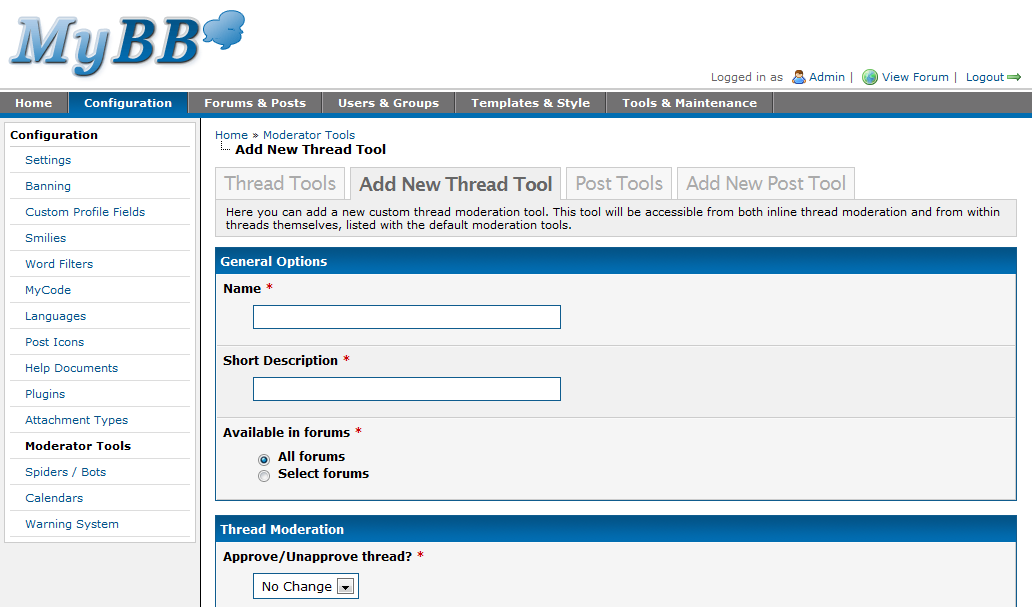
Moderator Tools

Moderator Tools

Adding a Thread Moderation Tool

Adding a Thread Moderation Tool

Adding a Thread Moderation Tool

Adding a Thread Moderation Tool

Adding a Thread Moderation Tool

Adding a Thread Moderation Tool

Spiders / Bots

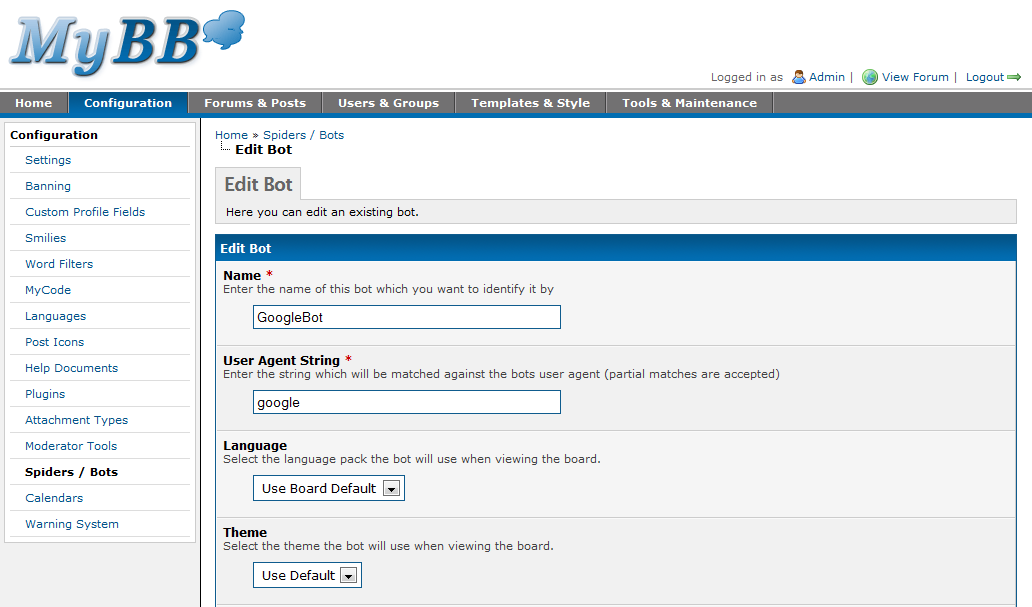
New in MyBB 1.4 is a fully featured spider & bot tracking system. You can now configure which bots are identified by MyBB by specifying part of their user-agent, assigning them to a custom user group, showing them a certain theme or changing their language. You can also see when each spider last visited your forum.
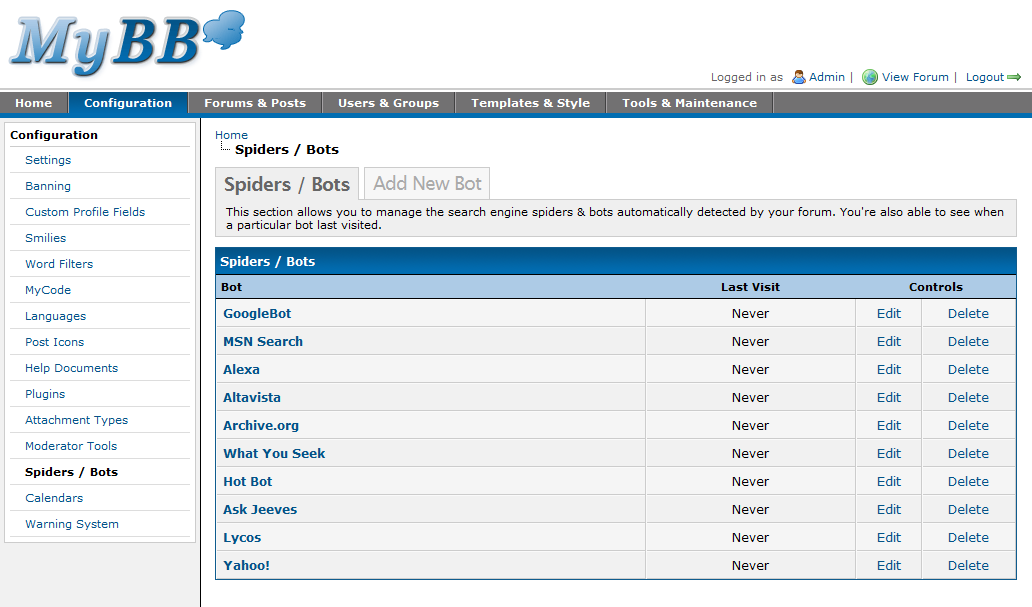
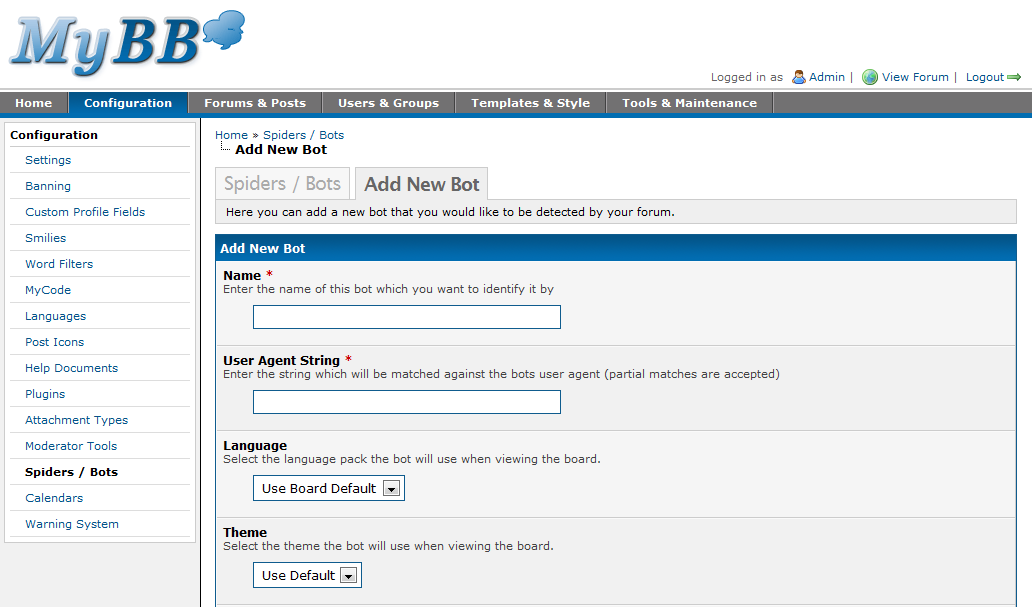
Spiders / Bots

Spiders / Bots

Adding a Spider

Adding a Spider

Editing a Spider

Editing a Spider

Calendars

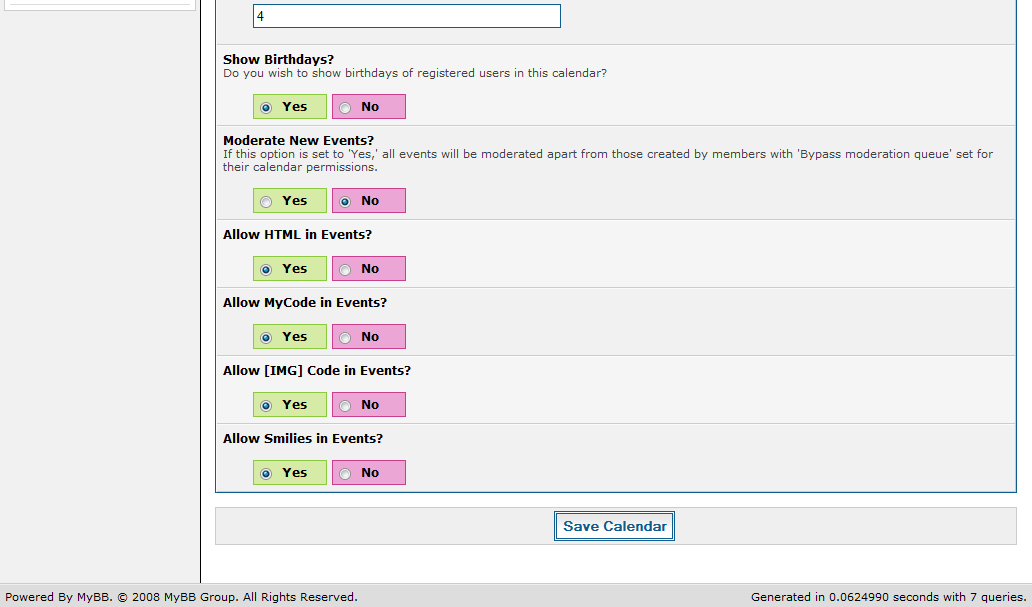
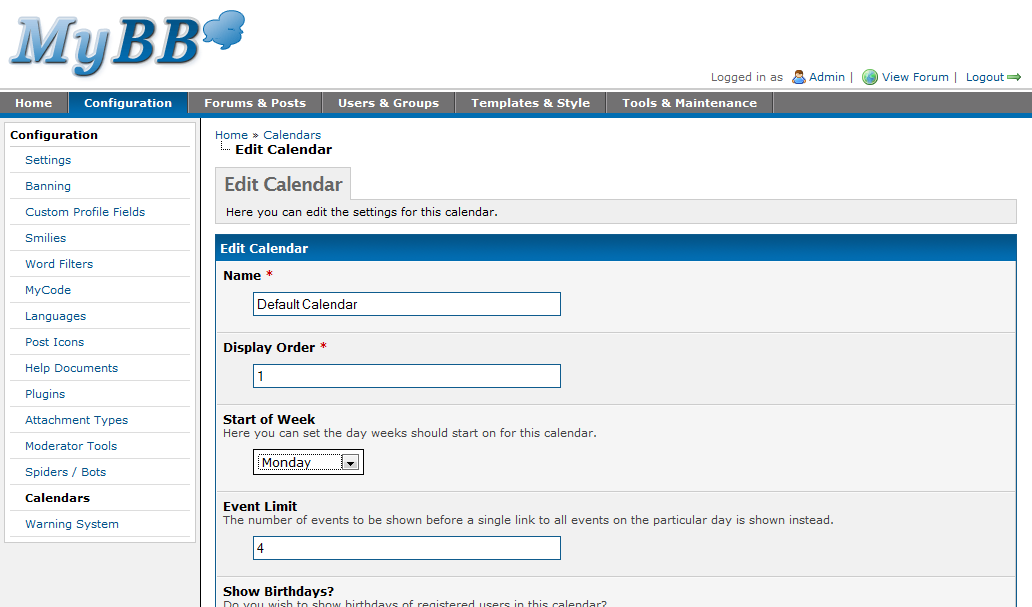
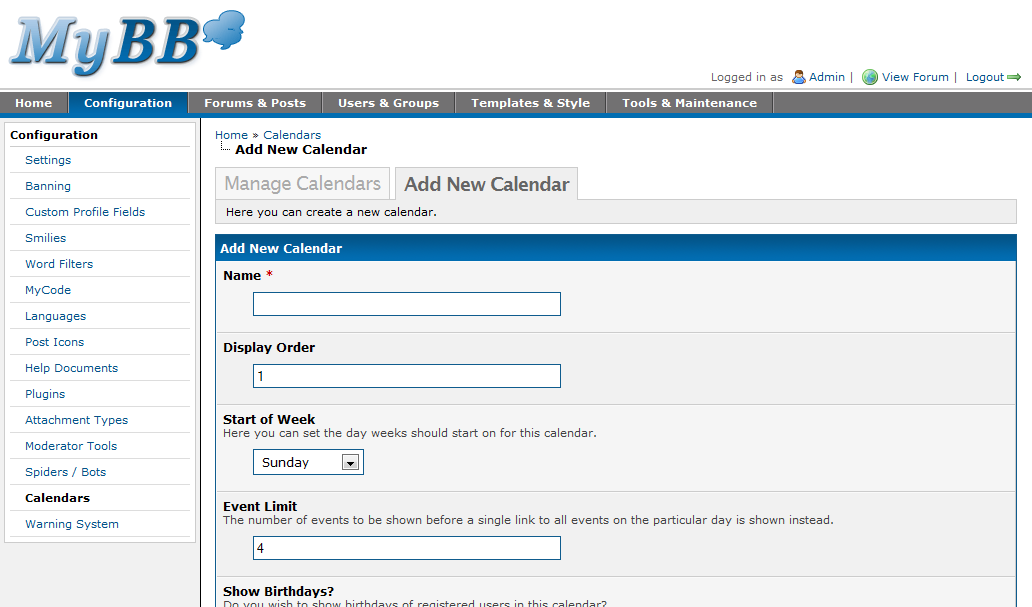
For those that don’t already know, MyBB 1.4 supports multiple calendars. Each calendar has its own settings, permissions and can have different events posted to it. The calendar management pages allow you to create these calendars and specify options such as:

  • The day the start of the week should fall on
  • Whether or not to moderate new events before they’re publicly visible
  • If HTML, MyCode, Smilies, or [IMG] code should be allowed to be used within posted events

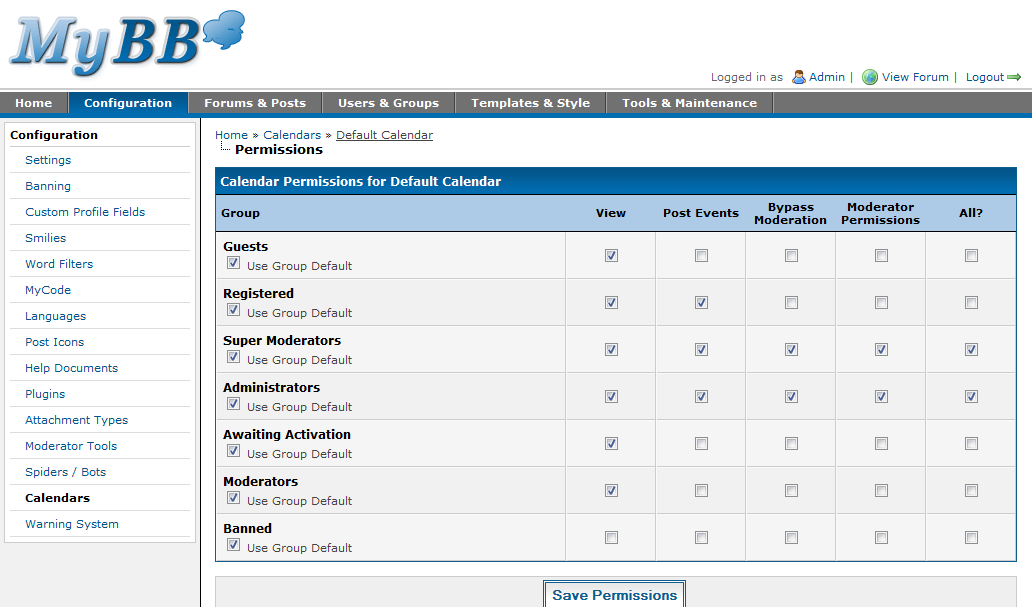
Calendar permissions work in much the same way that group permissions do – that is members whom are a member of multiple user groups will have the permissions applied from each of the permissions they have for a particular category.
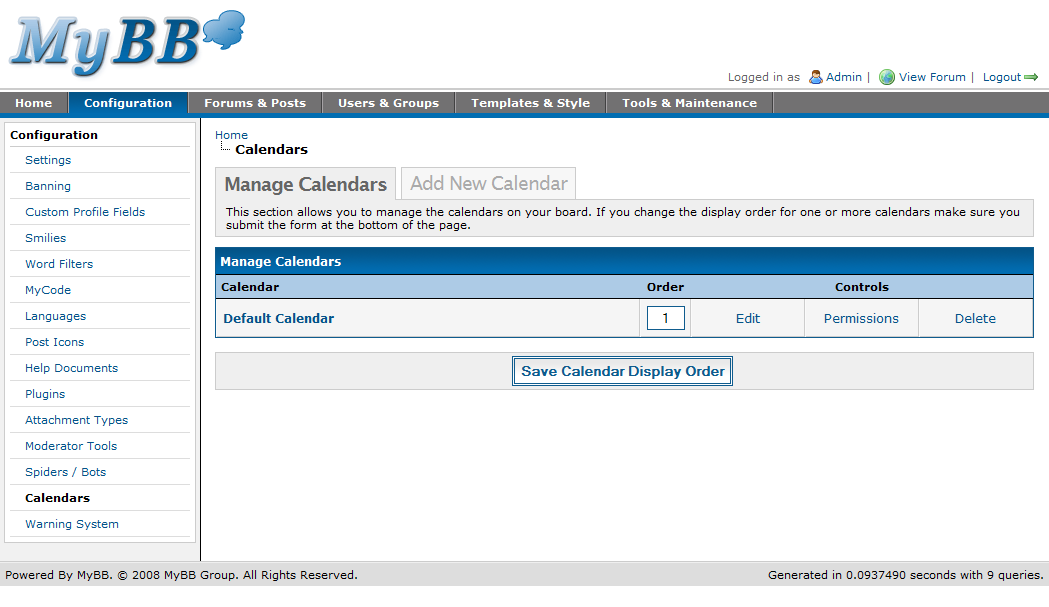
Calendars

Calendars

Adding a Calendar

Adding a Calendar

Adding a Calendar

Adding a Calendar

Editing a Calendar

Editing a Calendar

Editing Calendar Permissions

Editing Calendar Permissions

Warning System

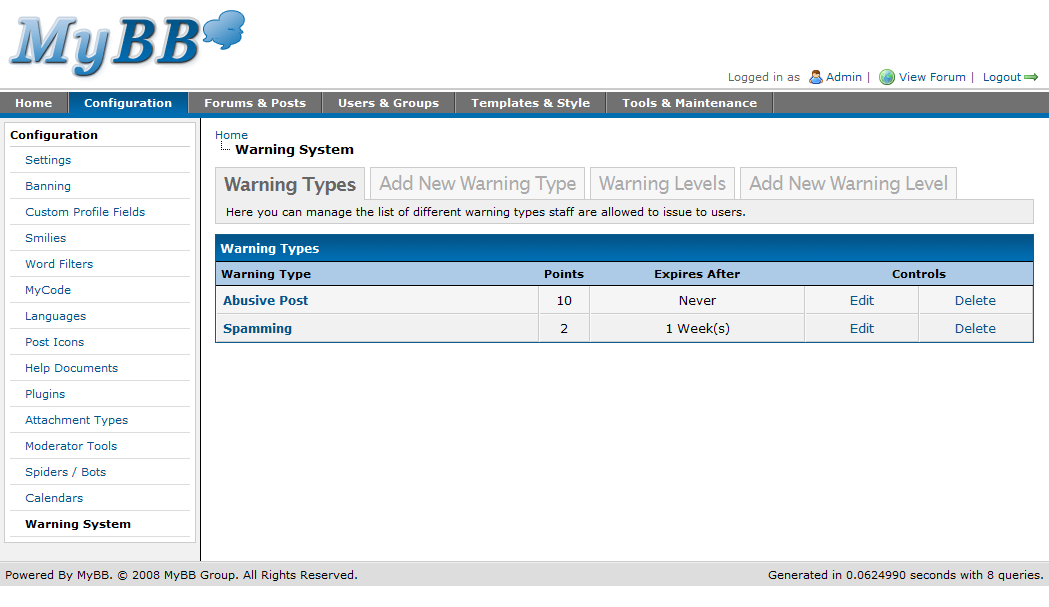
Also new in MyBB is a very powerful warning feature allowing you to warn users for offences they commit and have them automatically banned, their posting privileges revoked or their posts moderated for a certain amount of time.

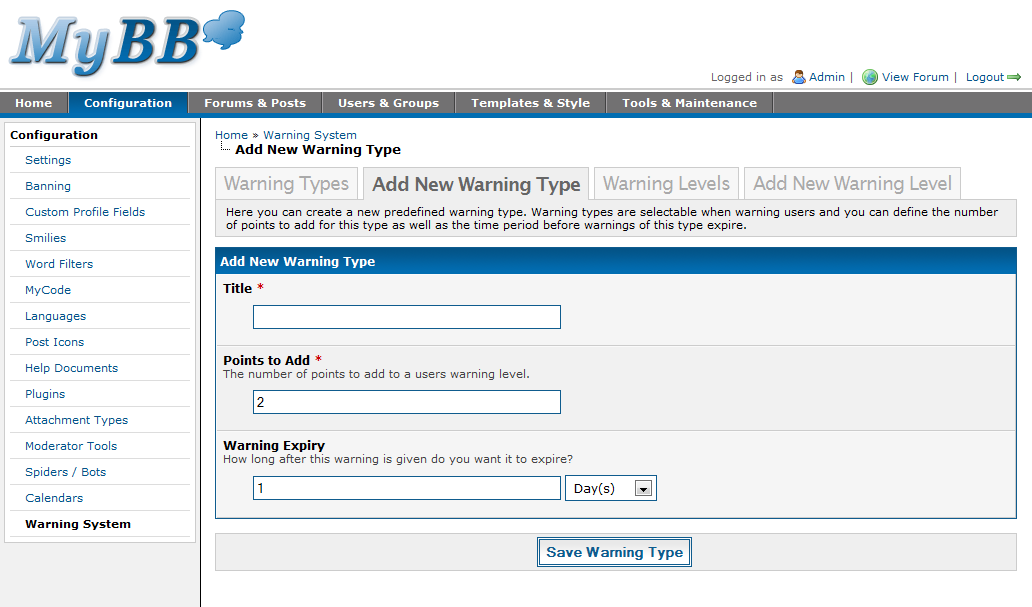
The warning system pages allow you to create the various warning types (reasons) that can be issued to a particular user, the number of points the warning should add to the user’s warning level and the period of time before those warning points expire.
Warning Types

Warning Types

Adding a Warning Type

Adding a Warning Type

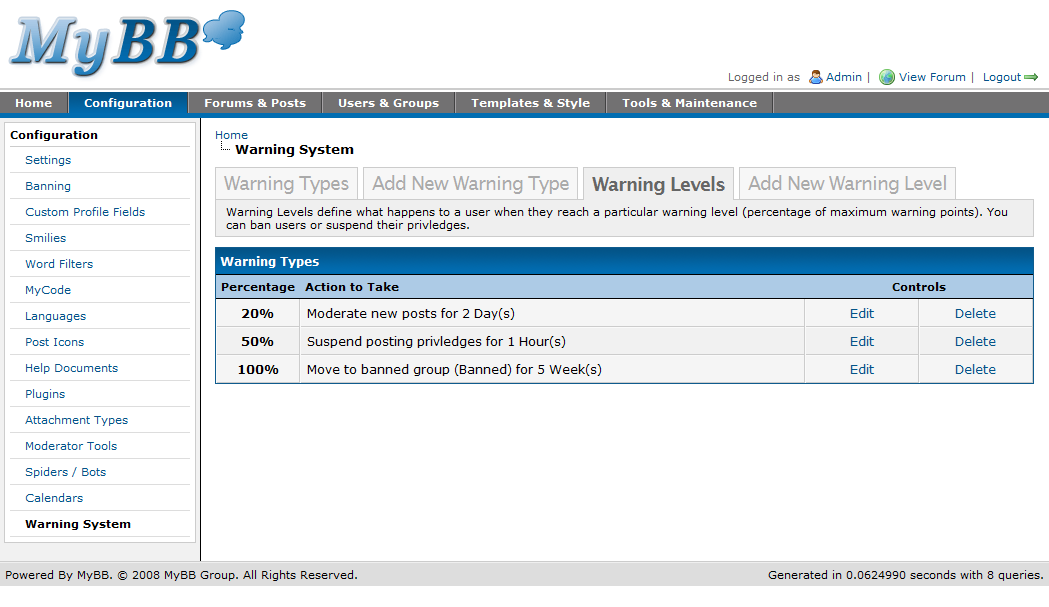
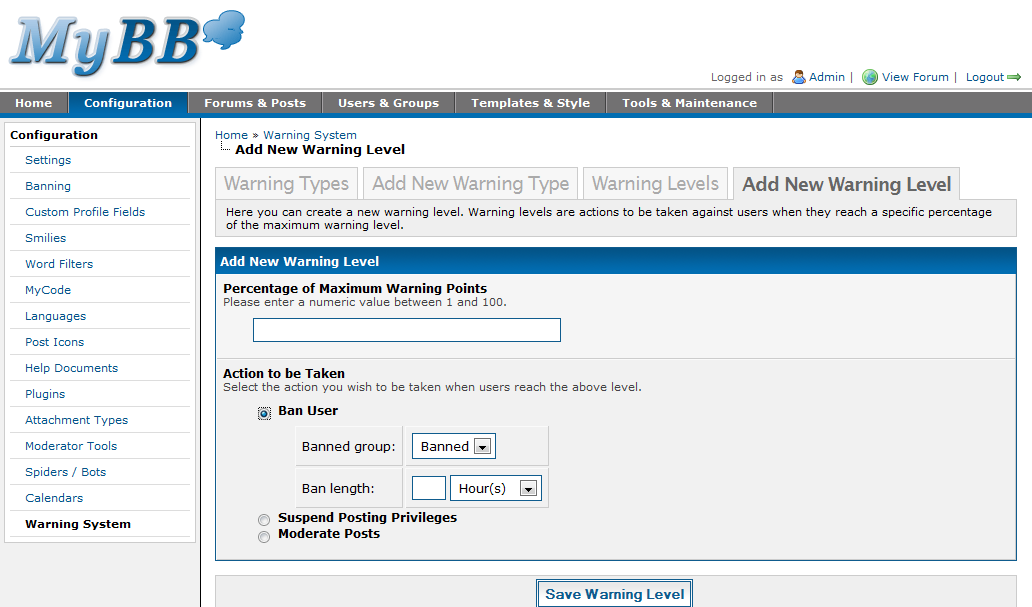
You can also create different “warning levels”. A warning level contains actions that should be taken against a user once they reach a certain warning level (percentage, out of 100%). From here you can choose to ban the user, suspend the users posting permissions or moderate all of the users new posts. For each of these actions you can specify the time before this penalty expires.
Warning Levels

Warning Levels

Adding a Warning Level

Adding a Warning Level

Questions? Comments? Anything else?

As you can see, there’s quite a lot you can do under the configuration section but it shouldn’t be too confusing as everything is really well organised. If things look confusing, that’s just because you haven’t actually used the administration panel yet – but once you do, I guarantee you’ll find it very easy to use.

That’s all I’ll be covering for this overview, however another overview covering the “Forums and Posts” as well as “Users and Groups” tabs will be posted next week along with some of the technical design and decisions with the new Admin CP.

I invite you all to post any feedback or queries you may have. If you don’t like something, we’ll do our best to try and take your advice on board (if it’s possible and actually works). There’s still a lot we have to go through, so don’t by any means think that this is all you’ll be getting.

Comments

  1. 1.

    rcpalace (February 10th, 2008, 12:03 pm)

    Nice, I like it! Some useful features have been added and a nice plus for the version update system for us plugin creators!

  2. 2.

    Audentio (February 10th, 2008, 12:03 pm)

    *Jaw drops*

  3. 3.

    Zalaki (February 10th, 2008, 12:03 pm)

    Looks very promising and so much better, I think this is going to make MyBB Rock.. So simple to navigate through and so much to do, new warn system and everything is great.

    :)

  4. 4.

    FirefoxWiz (February 10th, 2008, 12:15 pm)

    Looks awesome! Everything does so far, that I’ve seen. But I’ve one question.. With warning levels, can we set them so that the points will never expire?

    Now I see why 1.4 has taken so long!!! :D Everything looks top notch.

  5. 5.

    Staff Response: Justin S. (February 10th, 2008, 12:17 pm)

    FirefoxWiz, each type of warning you create can have a different expiry time – you can also choose to have them never expire.

  6. 6.

    DragonLord (February 10th, 2008, 12:32 pm)

    I wounder if other other forum sofrware company are going to choke on this….

  7. 7.

    roy (February 10th, 2008, 12:37 pm)

    Nice wonderfull,thanks all Mybb Team :)

  8. 8.

    xScopex (February 10th, 2008, 12:56 pm)

    All I have to say is WOW! You guys did a great job, I can’t believe my eyes!

  9. 9.

    Jared (February 10th, 2008, 12:59 pm)

    Very cool guys, I am impressed that its getting closer to PHPBB 3. Considering that you guys were better than PHPBB2 but you guys are catching back up and I think I am switching my forums back to you guys.

  10. 10.

    Netsage (February 10th, 2008, 1:04 pm)

    Wow Guys great job. But what will part 2 be? I mean what else did you guys add.

  11. 11.

    ct2k7 (February 10th, 2008, 1:07 pm)

    Wow – wonderful!

  12. 12.

    Kwek (February 10th, 2008, 1:12 pm)

    Totally wonderful! The Admin CP looks completely great! Now I know for sure MyBB 1.4 is worth the wait.

    Kwek

  13. 13.

    Staff Response: Tikitiki (February 10th, 2008, 1:20 pm)

    NetSage,

    The other parts will be on the other ACP pages that you haven’t seen yet and some of our technical design decisions and processes etc.

  14. 14.

    ct2k7 (February 10th, 2008, 1:22 pm)

    I’m guessing from the dashboard homepage that we are not meant to see the mybb version number?

  15. 15.

    Dane (February 10th, 2008, 1:26 pm)

    The only question left is…What browsers does the new design support?

  16. 16.

    Staff Response: Chris Boulton (February 10th, 2008, 1:26 pm)

    The version number is 1.4. It was just removed because currently it says “1.2″ and I didn’t want people to be confused.

  17. 17.

    Staff Response: Chris Boulton (February 10th, 2008, 1:29 pm)

    Dane, our browser compatibility hasn’t changed. Any “A” grade browser (considered by Yahoo!) such as IE6+, Firefox, Safari, Opera, etc. all have full compatibility.

  18. 18.

    DCR (February 10th, 2008, 1:33 pm)

    Just WOW.

    It looks extremely amazing! Congratulations you guys are developing the best Forum software.

    Can’t wait to actually use this thing.

  19. 19.

    pepotiger (February 10th, 2008, 1:36 pm)

    thanks for the great review :)

  20. 20.

    crsoft (February 10th, 2008, 1:51 pm)

    OMG that looks awesome.

  21. 21.

    oMega_2093 (February 10th, 2008, 2:11 pm)

    Really nice. MyBB is now at a higher level :D

  22. 22.

    Mybb 1.4 Admin Paneli Görüntüleri Resmi sitesinde yayınlandı! | vBMaster.Org Seo Yarışması (February 10th, 2008, 2:14 pm)

    [...] Mybb 1.4 Admin Paneli Görüntüleri Resmi sitesinde yayınlandı! tarafından 9 Şubat, 2008tarihinde gönderildi. Resmi sitesindeki görüntüelri görmek için tıkla [...]

  23. 23.

    NanaFreak (February 10th, 2008, 2:20 pm)

    Wow, this is just great!

    I can’t wait to use this new version for my board!!

  24. 24.

    [MyBB News] MyBB Development Blog Launches - AdminFusion (February 10th, 2008, 2:28 pm)

    [...] 1.4 Admin CP overview was posted on the blog today MyBB 1.4 Admin CP – The Complete Overview (Part 1) [...]

  25. 25.

    Arno (February 10th, 2008, 2:35 pm)

    I’ve translated this post turkish. http://alioktay.info/mybb/50-mybb-1.4-admin-paneli-goruntuleri.html

    BTW, Thank you chris. it is more simple, useful and functional as I see…

  26. 26.

    dvbsoftpk (February 10th, 2008, 3:15 pm)

    Just WOW.

    It looks extremely amazing! Congratulations you guys are developing the best Forum software.

    Can’t wait to actually use this thing.

  27. 27.

    AjEe (February 10th, 2008, 3:16 pm)

    Already MYBB rocks and with this new MyBB version .. Now its at higher peaks ..

    Simply Rocks :)

  28. 28.

    EviL (February 10th, 2008, 3:45 pm)

    If we really want to make a BIG step, we should consider integrating Advanced Text Editing in MyBB.

    Stop the confusing MyCode making crazy our users when they want to make “nice” formatted posts :)

    If the Warning System was integrated now by default, why don’t do the same with something like HotEditor? –> http://www.ecardmax.com/hoteditor/index.html)

    Please answer me. I’ve been asking myself this question many years ago, and I think now it’s the time for MyBB in its v1.4 having that outstanding feature that targets the MAIN use of the dashboard (messages formatting & posting). That would let our competitors faaar away from us ;D Everybody would know MyBB as the “nice” and “easy to use” forum.

    Keep up the great work guys!

    Cheers.

  29. 29.

    Staff Response: DennisTT (February 10th, 2008, 4:24 pm)

    EviL, a WYSIWYG editor’s probably going to be in a future version of MyBB.

  30. 30.

    Bas (February 10th, 2008, 6:11 pm)

    Wow, great work guys. I really like this new ACP design.
    Everything looks easy to find and logical, just like you sad.

    I’m looking forward to see Template & Style overview. That part interest me the most.

    Regards

  31. 31.

    Kikkerking (February 10th, 2008, 6:11 pm)

    That’s awesome to see, thanks for the info guys. Can’t wait. :D

  32. 32.

    Adrian Hayter’s Blog » Blog Archive » MyBB 1.4 Admin Control Panel Revealed! (February 10th, 2008, 6:37 pm)

    [...] Check it out at the Official MyBB Blog [...]

  33. 33.

    D4rkmor3 (February 10th, 2008, 7:27 pm)

    Woow Very Good .Tnks Mybb Group….

  34. 34.

    Mybb 1.4 Admin Panel | D4rkmor3 Blog (February 10th, 2008, 7:31 pm)

    [...] Mybb 1.4 Admin Cp  [...]

  35. 35.

    S3dat (February 10th, 2008, 8:48 pm)

    Very good.
    I like 1.4.Thank mybb

  36. 36.

    dvb (February 10th, 2008, 8:52 pm)

    looks much better than the current ACP! :P

    about the “Quick Access” part (in the secondary navigation bar in the left of the “Home” tab) -

    can we add another links to that part (user’s customized links) ?

  37. 37.

    KacperOo (February 10th, 2008, 8:55 pm)

    Cool!
    When it will come?
    I can’t wait anymore!

  38. 38.

    emrebursali_2 (February 10th, 2008, 8:57 pm)

    hello, woow beautiful mybb 1.4 :D
    what time? :D

  39. 39.

    Tahiel (February 10th, 2008, 9:00 pm)

    Amazing! I can’t wait to see the rest of the AdminCP sections and new features. You’re really doing an awesome job! Thanks for your hard work!

  40. 40.

    Aweb (February 10th, 2008, 9:59 pm)

    Good job !

    Can’t wait for its release ;)

  41. 41.

    Aglioeolio (February 10th, 2008, 10:00 pm)

    Really nice presentation :D
    Can´t wait to see them in my community

    Is there any chance ‘custom Board icons’ been implemented by default in 1.4?
    This could be a very attractive feature for new mybb users…

  42. 42.

    dared (February 10th, 2008, 10:11 pm)

    its pretty cool. thx for all support team. i looks real good..

  43. 43.

    xiaozhu (February 10th, 2008, 10:25 pm)

    woah!!!

    haha

    we should spread the news even further to show the superiority of MyBB!

  44. 44.

    Sebastian (February 10th, 2008, 10:39 pm)

    Wow it looks yery nice. I hope that the WYSIWYG is coming. Im badly that is no public beta…

  45. 45.

    iskelet (February 10th, 2008, 10:52 pm)

    looking nice!!!
    i am looking forward to use it
    thanks…

  46. 46.

    John Briggs (February 10th, 2008, 11:36 pm)

    Just amazing. Hats off to all of you. I cannot wait.

  47. 47.

    Staff Response: Justin S. (February 10th, 2008, 11:59 pm)

    To everyone who’s mentioned it: A WYSIWYG editor is planned for some point in the future, but it won’t be coming in 1.4.

  48. 48.

    Jag100 (February 11th, 2008, 12:37 am)

    WOW. amazing. You lot have done a brilliant job on this :)

  49. 49.

    Faby (February 11th, 2008, 12:41 am)

    When you hand out a warning to a member, can you specify an expire date then or will it only be based on the expire date set for the particular type of warning in the ACP?

    I mean,let’s say that spam warnings expire in 3 days, but when I give out the warning, can I set it never to expire?

  50. 50.

    dvb (February 11th, 2008, 12:42 am)

    about the “Quick Access” part (in the secondary navigation bar in the left of the “Home” tab) -

    can we add another links to that part (user’s customized links) ?

  51. 51.

    Staff Response: Justin S. (February 11th, 2008, 12:55 am)

    Faby, you can also specify a custom warning type at the time of the warning, which includes a name for the type, the number of points to give, and the time of expiry.

    dvb, at this time, no, you cannot add other links there.

  52. 52.

    Gkhn (February 11th, 2008, 1:59 am)

    to be continued .. (:

  53. 53.

    Staff Response: destroyer (February 11th, 2008, 2:19 am)

    On a side note: we still don’t have a release date set.

  54. 54.

    FirefoxWiz (February 11th, 2008, 2:26 am)

    “you can also specify a custom warning type at the time of the warning, which includes a name for the type, the number of points to give, and the time of expiry.”

    Cool. :D Sounds excellent!!

  55. 55.

    azd (February 11th, 2008, 2:39 am)

    Nice Look!
    Thank you Guys !

  56. 56.

    bk2070 (February 11th, 2008, 2:48 am)

    Wow, this is great. Some screenshots! What’s great is the new Spider Logs, and the Warning Sytems.

  57. 57.

    Tom (February 11th, 2008, 2:52 am)

    Wow, i am very impressed, i hope this lot comes with a nice dab of ajax processing, the fam fam icons and the post icons will make a hell of a difference, when is the “average” kind of release date for this?

  58. 58.

    Chris (February 11th, 2008, 3:55 am)

    Looking Good!

    One small thing though, why on the login screen is the right part of the logo missing?

  59. 59.

    Hockey Foo (February 11th, 2008, 4:24 am)

    SWEET!
    Looks like a easy to use, but powerful system.

  60. 60.

    t0m (February 11th, 2008, 5:42 am)

    This is very nice! Is 1.4 supposed to be a improvement in just the ACP? Or on the forums themselves, too?

  61. 61.

    gsv13 (February 11th, 2008, 5:56 am)

    It is a request to add Wsywyg editor in 1.4 version only ….. only paid forum scripts have it …. this will make mybb stand out of others.
    Anyway screeshots looks nice!

  62. 62.

    Staff Response: DennisTT (February 11th, 2008, 10:37 am)

    Also I want to remind you that MyBB 1.4 is FEATURE-FROZEN. If it’s not already in, it won’t be in for 1.4.

    But keep your suggestions coming at MyBB Ideas: http://ideas.mybboard.net – we will look at popular suggestions for future versions of MyBB>

  63. 63.

    logix (February 11th, 2008, 11:27 am)

  64. 64.

    Staff Response: Justin S. (February 11th, 2008, 12:30 pm)

    Tom, there are countless new features added to 1.4 in addition to a brand new Admin CP. See the 1.4 article on the wiki.

  65. 65.

    darkmew (February 11th, 2008, 4:06 pm)

    wow this looks uber cool
    looking forward to installing it the day it comes out
    thanks for all your hard work mybb team
    keep it up

  66. 66.

    crsoft (February 11th, 2008, 7:11 pm)

    so are the “True slaves/masters load-balancing system for MySQL(i) and PgSQL ” setting on this tab what is reviewed or is that all in install?

  67. 67.

    Mr.Whisper (February 11th, 2008, 8:20 pm)

    that look very well.

    i hope that may be easy to use like acp in 1.2

    ———————–

    i use MyBB 1.2 ’cause ACP is easy to use like phpBB2 ACP. i hope in 1.4 that will still be that

  68. 68.

    Staff Response: ZiNgA BuRgA (February 11th, 2008, 9:47 pm)

    @crsoft: All DB configuration will still be in the inc/config.php file – since you shouldn’t need to change your DB settings every few days (and, well, it’s not logical to place database settings in the Admin CP).
    Unless you run a large board with multiple SQL servers however, this shouldn’t worry you :P
    If you do need to change your DB settings, you can still do so by editing the inc/config.php file – it’s well commented so shouldn’t be too difficult to follow.

  69. 69.

    Jared (Oatman) (February 12th, 2008, 3:03 am)

    Guys,

    I thought that you all were starting to quit because of PHPBB3 but seeing this released shows me that you guys are really cool. I like this better because its more like a vBulletin and you guys are absolutely amazing! Keep up the good work!

  70. 70.

    Jared (Oatman) (February 12th, 2008, 3:07 am)

    As a side note:

    It may be good to release a beta since you still may have problems with SQL Injections since alot of code was re-written.

  71. 71.

    FirefoX (February 12th, 2008, 3:43 am)

    That’s really wonderful! Thanks, Chris.

    I translated this article into Turkish: http://www.ingilizceforum.net/showthread.php?tid=14036

  72. 72.

    MenthiX (February 12th, 2008, 6:15 am)

    Looks great, definitely much cleaner interface. Like the new features too.

  73. 73.

    michaelh (February 12th, 2008, 7:23 am)

    Woooooooooooooow.

    I am in shock.
    It looks amazing.

    I hope it feels the same way :)

  74. 74.

    Staff Response: destroyer (February 12th, 2008, 8:20 am)

    Chris: there’s no missing right part, though.

  75. 75.

    Tristan (February 12th, 2008, 10:15 am)

    Oh my God, I am truly astounded. Bravo guys! Can’t wait till this gets released. That warning system especially, WOW. Way to go!

  76. 76.

    Staff Response: Justin S. (February 12th, 2008, 10:16 am)

    Yes there is, destroyer: The quotes in the upper right.

    I know I didn’t notice it until he pointed it out…

  77. 77.

    Faby (February 12th, 2008, 9:22 pm)

    Hmm,now that I look better,there is no info on the ModCP under the Configuration tab. Is it set somewhere else? :P

  78. 78.

    Baldilocks (February 13th, 2008, 12:40 am)

    Very nice additions to the MyBB package.

    One commenter asked if other forum packages will choke on this. I would say no, as all of these features are nearly identical to vBulletin anyway. (Especially new “warning” system–which vB calls infractions.)

    For those of you who don’t want to pay for vB, MyBB is a good free choice but it isn’t revolutionary.

  79. 79.

    Renegade (February 13th, 2008, 6:04 am)

    Amazing! I can not wait to have this! I love myBB already, and from the look of v.4, I will like it even more!

    I want to develop a good PHP/mySQL program like this eventually, but I never will.

    Great job!

  80. 80.

    dyrer (February 13th, 2008, 6:23 am)

    Great work guys. I can’t wait to see the final version.
    Well Done

  81. 81.

    Splatzone (February 13th, 2008, 6:25 am)

    Cool!

    I like the choice of famfamfam for the icons.

    Don’t have much else to say except “Keep up the good work”!

  82. 82.

    Jordan (February 14th, 2008, 7:39 am)

    Nice use of the Silk icons there! Might make me move back to MyBB in the future! Good work guys!

  83. 83.

    seaboy1234 (February 14th, 2008, 3:40 pm)

    Its so cool I cant speak vary well.

  84. 84.

    TAEL (February 14th, 2008, 8:05 pm)

    WOW ! It’s Beautiful !

    I’m waiting for release !

  85. 85.

    ivenms (February 15th, 2008, 2:44 am)

    Waiting for the new version for a long time. I hope that every mods working on the existing versions will work on the new set of versions (1.4). If not so, it will be very disappointing.

    The admin panel is looks good, actually I expected a lot more in design. But this is perfect and simple. I hope to see good improvements in design on board front pages.

  86. 86.

    SeKoMirZa (February 15th, 2008, 2:50 am)

    thats great man !

  87. 87.

    rcpalace (February 15th, 2008, 3:53 pm)

    Acutally, it looks similar to phpbb3’s admin panel. I hope though it’s not as complicated.
    Kind Regards.

  88. 88.

    Psammes (February 15th, 2008, 5:56 pm)

    Su bloomin perb. Look forward to playing…

  89. 89.

    MyBB 1.4 Geliyor (February 15th, 2008, 10:29 pm)

    [...] kolaylaştıran yeni şeyler olacağı kesin.MyBB 1.4 versiyıonun admi paneli görüntülerine buradan [...]

  90. 90.

    crsoft (February 16th, 2008, 12:44 pm)

    @rcpalace
    yes it dose look a bit like it but i am sure mybb has made it easy as to work.

  91. 91.

    seocontest2008 (February 17th, 2008, 6:53 am)

    This looks absolutely **** amazing, i have a mybb & vb installation & i rekon i will start to favor mybb as 3.7 of vb does not look up to much. Great work guys.

  92. 92.

    MyBB 1.4 in Arbeit - Boardunity Forum (February 17th, 2008, 9:33 pm)

    [...] Hier findet man die ganzen neuerungen ->Klick Und hier die ganzen Bilder zum Admin CP- >Klick H

  93. 93.

    Nikolay (February 19th, 2008, 5:03 am)

    It’s very nice!
    The ACP very pro…

  94. 94.

    tolgahant (February 21st, 2008, 4:16 am)

    it’s very nice..

    Thx

  95. 95.

    toni (February 25th, 2008, 12:23 am)

    Yes really cant wait to take some of them stuff and i WILL leave credits to you

  96. 96.

    StingReay (February 29th, 2008, 8:18 am)

    Wow, the ACP looks so… … …phpBB3-ish. (And by phpBB3-ish, I mean full of tabs, which is good for the nubs. ^.^)

  97. 97.

    crsoft (March 1st, 2008, 5:09 pm)

    when are we going to see more admincp images?

  98. 98.

    pachel (March 1st, 2008, 11:01 pm)

    this is very nice i hope the mybb board 1.4 is soon out

  99. 99.

    iryx (March 4th, 2008, 3:21 am)

    It looks great because I gotta say 1.2 AdminCP is kind of a pain in the ass ^^

    No, really, I can’t wait for the final 1.4 to be out and I’m glad I’m converting to MyBB, I think I have made the right choice!

  100. 100.

    Lady Angelique (March 6th, 2008, 12:38 pm)

    It looks really awesome and I really can’t wait till it is officially released…or I can’t wait till the BETA is released…

    My one concern is for the Custom Profile Fields…

    If the Option to enter a list of options is not shown…than how do we enter a list of options for those fields which are not text input or text areas…suppose we wanna do a drop down menu or a check box or a radio box type of fields…how do we enter a list of option for those???

    Other than that…it looks awesome

  101. 101.

    Staff Response: Justin S. (March 7th, 2008, 8:07 am)

    Lady Angelique, the options field for types that require a list of options is only shown when those types are selected. Otherwise, it’s hidden.

  102. 102.

    Lady Angelique (March 11th, 2008, 4:18 am)

    KEWL U GUYS ROCK!!! I CANT WAIT TILL THE RELEASE OF 1.4 Version!!!!!

    DAMN!!! AM SO EXCITED!!!!

  103. 103.

    MyBB 1.4 Admin CP - The Complete Overview (Part 3) | MyBB Development Blog (March 18th, 2008, 12:41 pm)

    [...] MyBB 1.4 Admin CP – The Complete Overview (Part 1)Screenshots from the MyBB 1.4 BetaThe MyBB Development BlogSecuring your MyBB InstallationMyBB 1.4 Admin CP – The Complete Overview (Part 2) Open MyBB Team Positions [...]

  104. 104.

    Aquied (March 30th, 2008, 3:02 am)

    Sorry I don`t speak english, but …
    WOOOOOOOOOOOOOW… this version of Mybb is wonderful…

    Only works with PHP5??…
    This version is free??¿?¿

    EHHHHHHHHHHHHHHHHHH!!!

  105. 105.

    Staff Response: Tikitiki (March 30th, 2008, 5:55 am)

    Aquied, No it works with PHP 4 still and yes, it will always be free.

  106. 106.

    masa (April 16th, 2008, 6:38 am)

    AWESOME!!

    I love to see tons of changes and new (requested) features. Great job!
    I’ll make another donation as soon as 1.4 is running on my server.

    go go go!
    :o )
    Masa

  107. 107.

    MAHMUT (April 22nd, 2008, 12:12 am)

    its like good. when this version finish.. so it has been late.. i hope this version will be best. because 1.2.12 is has got some important bug. ex. logout- login vs… good works…

  108. 108.

    CukSukr (October 11th, 2008, 2:15 pm)

    I am sorry for spamming – it really is my first. Yes mybb 1.4 is excellent!

Post a Comment

Note: * indicates required fields.